

A child sits through parents' evening hearing the same kind of praise they always get. “Works hard.” “Pleasant to teach.” “Needs to contribute more.” Everyone is kind, but nobody quite captures what that child did when they solved a problem in science, supported a classmate in a group task, or kept going after a difficult week. For many families, that's the moment the problem becomes clear. Traditional assessment often records the result, but not the journey.
That gap matters most for the children who already feel unseen. The quiet pupil with strong ideas. The anxious learner who freezes in timed tests. The creative student whose best thinking appears in sketches, voice notes, or practical work rather than in long written answers. Digital portfolios for students can give those children a safer, fuller way to show what they know, how they learned it, and who they're becoming.
A strong digital portfolio isn't just a folder of uploaded files. It's a carefully built learning story. When children help shape that story, many stop feeling judged by isolated grades and start recognising their own progress.
Meeting Student Needs with Digital Portfolios
Maya was the sort of student teachers often describe as “capable, but quiet”. In class, she understood more than she said. In written tests, she rarely showed the depth of her thinking. Yet when her teacher asked her to record a short explanation of her design idea and add photos of each stage, something changed. She could finally show the parts of learning that had been invisible.
That's why digital portfolios matter. They don't start with the system. They start with the child. A pupil who struggles to handwrite long reflections might explain their process in audio. A learner with dyslexia might use assistive technology for student academics to dictate ideas before editing them into a portfolio entry. A child with anxiety might feel calmer sharing work privately with one trusted teacher first, rather than presenting it live.
The emotional shift is often the most important part. Children who feel reduced to marks can begin to feel recognised. Children who think, “I'm bad at school,” can start to say, “This is how I learn best.”
A child-centred portfolio answers a simple question: what evidence helps this learner feel seen, safe, and understood?
When that question guides decisions, the portfolio becomes more than assessment. It becomes a place where confidence grows.
Understanding Digital Portfolios for Students
A digital portfolio is best understood as an interactive scrapbook of learning. It can hold writing, photos, scanned work, slides, audio clips, and video. Unlike a paper folder that fills up and gets forgotten, it can show change over time.
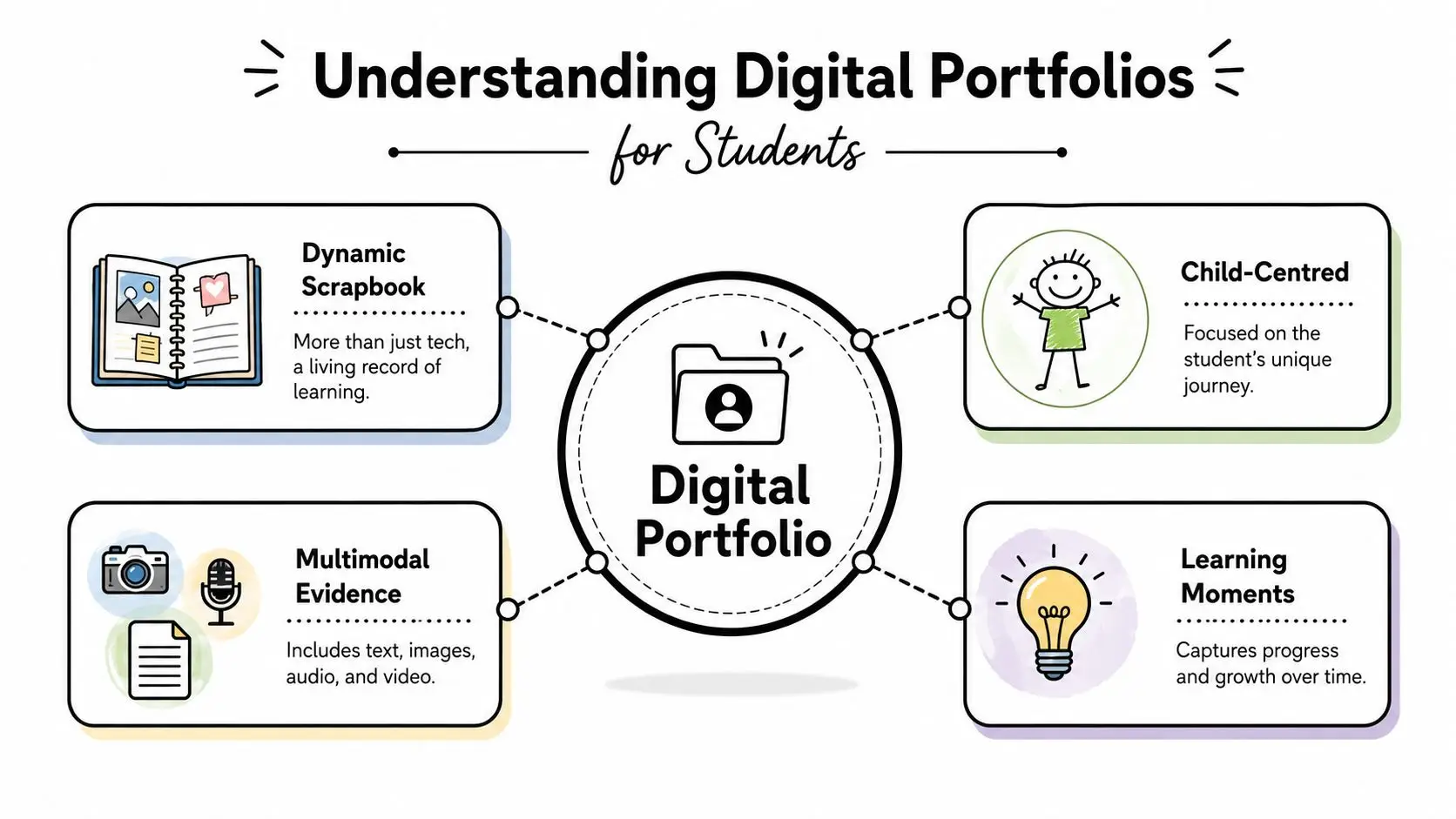
Picture a garden rather than a display board. A display board shows finished flowers. A garden shows seedlings, setbacks, pruning, and growth. In the same way, digital portfolios for students should include drafts, reflections, revisions, and moments of problem-solving, not just polished final pieces.
What belongs in a portfolio
The UK guidance from NCFE says learner portfolios should prioritise “quality and not quantity” and that students should carefully select and annotate evidence against assessment criteria. The same guidance specifies three file types for digital assets: video or screen recordings in MP4, MOV, or AVI, photographic images in JPEG or PDF, and audio recordings in WAV or MP3. It also places responsibility on the learner to ensure the portfolio contains “sufficient and reliable evidence” and requires a reference system or summary page so examiners can follow the contents clearly, as set out in the NCFE guide to designing and creating learner portfolios.
That sounds technical, but the idea is simple. Children shouldn't upload everything. They should choose evidence that proves learning.
For example:
- A science pupil might upload a photo of an experiment setup, a short audio explanation of what went wrong, and a final written conclusion.
- A primary learner might include a reading recording from the start of term and another from later on, then add a sentence about what improved.
- A group project team member might attach slides, a planning note, and a reflection on how they handled disagreement.
Why transversal skills matter
One of the biggest misunderstandings is that portfolios are only for showcasing finished work. Cambridge Assessment explicitly advocates e-portfolios to capture and assess transversal skills such as collaboration, critical thinking, and communication. That matters because many commercial guides focus on tools and organisation, but not on how to structure entries for assessing those skills, as discussed in Cambridge Assessment's video on using e-portfolios to capture and assess transversal skills.
A useful model is this: each entry should answer three questions.
| Portfolio question | What the child adds |
|---|---|
| What did I do? | The evidence itself |
| What was difficult? | A short reflection |
| What skill did I use? | A link to collaboration, communication, or critical thinking |
Families exploring online learning often find that portfolios make more sense once they also understand the role of a virtual learning environment. And if an older student wants inspiration on presenting work clearly, a creative industry resource such as this guide to building client-winning portfolios can spark ideas about structure, selection, and visual storytelling.
Benefits of Digital Portfolios for Students
Some school tools help teachers stay organised. Some help children revise. Digital portfolios do something more personal. They help a learner say, “This is my work. This is how I grew. This is what I can do now.”
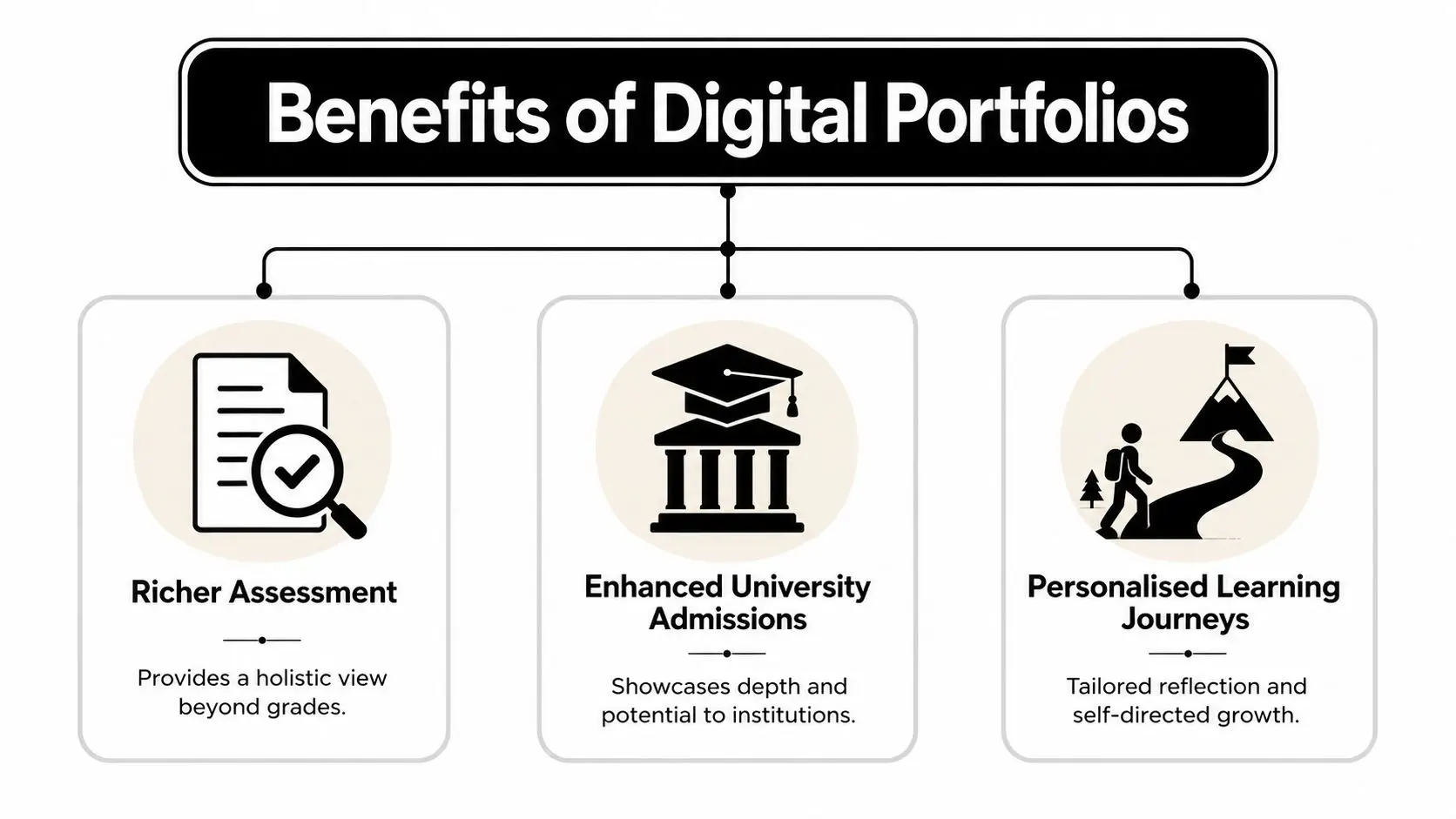
The National Centre for Computing Education notes that digital portfolios can “engage families and communities”, help students “track growth across different areas over time”, and support reflective narratives about challenges and insights gained. It also stresses that schools should use platforms that “comply with educational data protection regulations”, including the UK GDPR and the Data Protection Act 2018, when students share multimedia work in this overview of how digital portfolios can showcase student growth.
Richer assessment for real children
A test score can show whether a child got answers right on one day. A portfolio can show how they approached the task, revised their thinking, and responded to feedback.
That's especially valuable for children whose strengths don't always appear in timed conditions. A pupil might struggle in an exam hall but speak with clarity in a recorded explanation. Another might show strong critical thinking through annotations on a design draft.
When adults can see the process, they often understand the child more fairly.
This changes conversations at home too. Instead of hearing, “You got this grade,” families can discuss the video, paragraph, voice note, or image that shows what the child was trying to do.
Stronger preparation for admissions and future pathways
A good portfolio can also support applications for sixth form, university, or creative opportunities because it gives shape to a student's story. Queen Mary University of London describes showcase portfolios as a “powerful language” that helps students “demonstrate knowledge, skillsets, and achievements” through real work. It also stresses the value of case studies that explain the “problem you were solving” and the “outcome and impact” in its piece on using a digital showcase portfolio to demonstrate achievements.
That's useful far beyond art or design. A maths student can present an investigation. A computing student can explain the logic of a project. A humanities student can show how an early draft developed into a stronger argument.
More ownership and self-belief
Children often become more reflective when they choose what enters the portfolio and explain why it matters.
A simple pattern helps:
- Choose one piece: not the biggest task, just one meaningful example.
- Add a note: what was hard, what improved, what they'd do differently.
- Name the skill: organisation, resilience, communication, or analysis.
That last step matters emotionally. It helps children connect effort with growth. Instead of waiting for adults to define success, they start recognising it themselves.
Best Practices for Digital Portfolio Design and Privacy
A digital portfolio should feel clear and calm, not cluttered and risky. Many problems begin when adults focus on uploading work quickly and leave privacy, annotation, and access needs until later. Children feel that confusion immediately. They don't always say it, but they show it through avoidance, worry, or rushed submissions.
What good design looks like
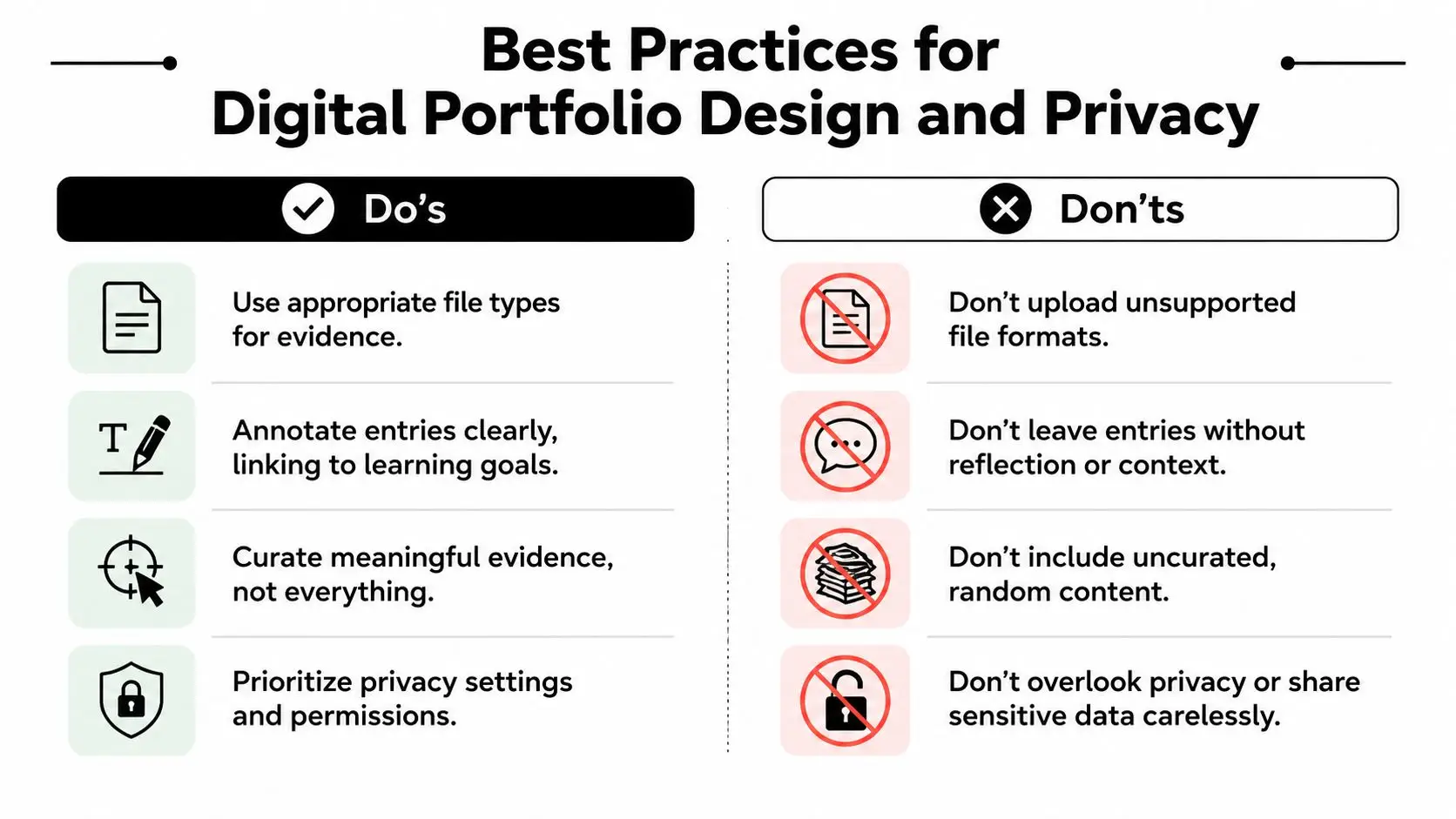
Start with fewer pieces and better explanations. NCFE's emphasis on quality over quantity is a useful principle for any age group. Every item should have a reason to be there.
Use this checklist:
- Choose suitable evidence: mix text with photos, audio, or video when that helps the child communicate more naturally.
- Annotate clearly: add a short note explaining what the work shows and which learning goal it connects to.
- Keep a contents system: a simple index page or section list helps teachers, parents, and examiners follow the story.
- Protect the child's dignity: don't upload sensitive material just because the platform allows it.
A messy portfolio can feel like a drawer full of random papers. A thoughtful one feels more like a labelled memory box.
Privacy and equity need equal attention
One overlooked issue is the tension between access and safety. A lot of advice assumes every family has a reliable laptop at home. That isn't the reality for all learners. Recent UK-specific data shows that 15% of UK households with secondary-age children lack reliable home computer access, relying instead on mobile devices, and many portfolio guides still don't explain how to build or manage portfolios in mobile-only situations. The same discussion highlights the need to align student portfolio practice with the UK GDPR, the Data Protection Act 2018, and newer ICO guidance on children's digital data in this discussion of the equity and data privacy paradox in UK student digital portfolios.
That affects design choices straight away.
A practical privacy checklist
| Area | Safer practice |
|---|---|
| Access | Check whether the child can upload from a phone as well as a laptop |
| Identity | Avoid unnecessary personal details in file names or reflections |
| Sharing | Limit visibility to the intended audience only |
| Support needs | Use simple routines and repeated prompts for students who feel anxious about technology |
Practical rule: if a child can't explain who can see their portfolio, the sharing setup is too unclear.
For learners with SEN or SEMH needs, predictable routines matter. A familiar template, consistent upload process, and visible privacy rules reduce stress. Accessibility matters too. Some children need speech-to-text, others need chunked instructions, and some need the option to reflect by audio rather than by writing.
A well-designed portfolio doesn't just collect evidence. It makes participation feel possible.
Step-by-Step Setup of Student Digital Portfolios
Setting up a portfolio goes smoothly when the structure is fixed first and the content comes second. If adults skip that order, children often end up with scattered files, broken permissions, and uncertainty about what belongs where.
A simple visual outline helps before anyone starts uploading.
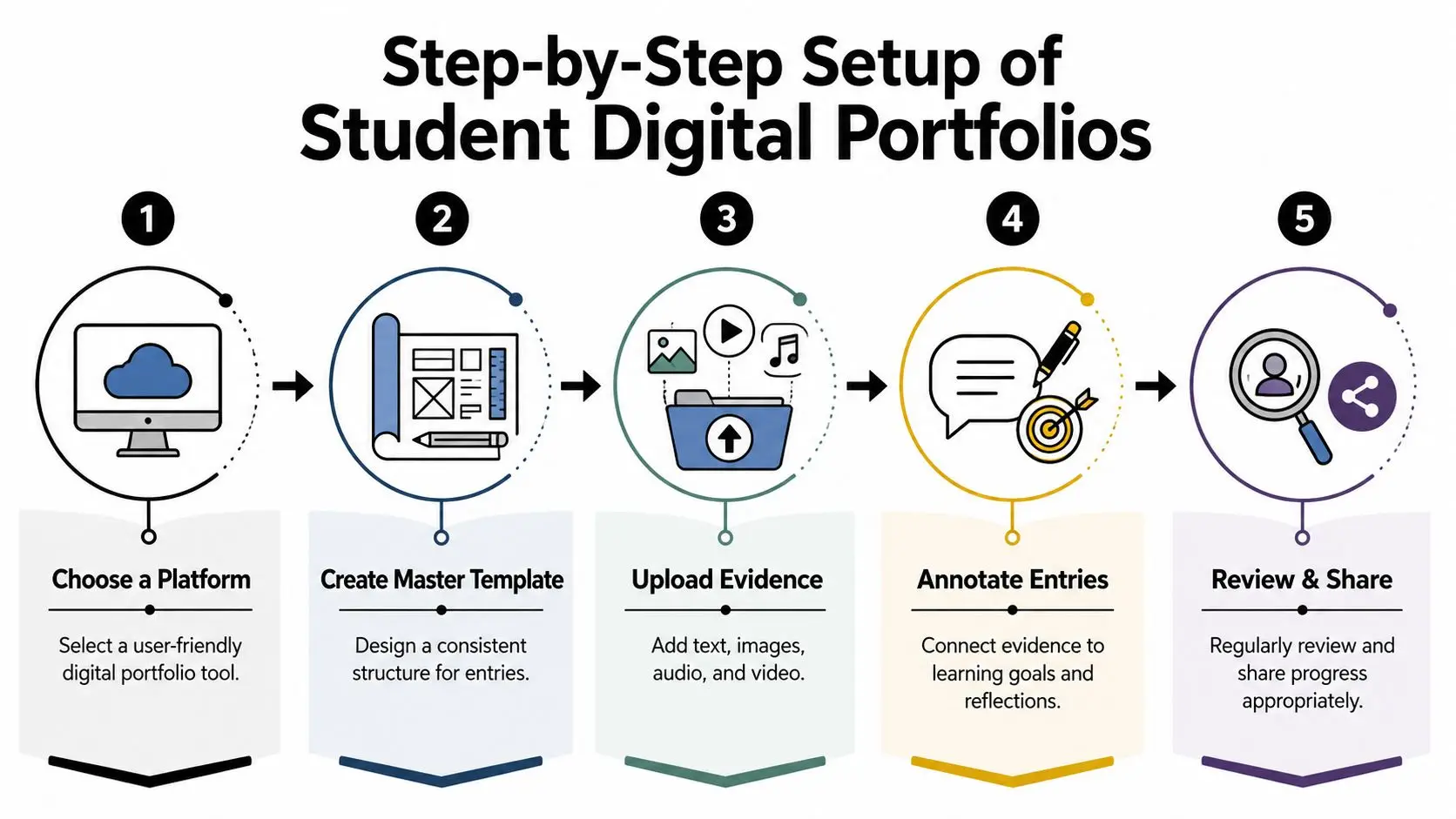
Step 1 to Step 3
Choose a platform the child can use
Google Slides, PowerPoint, PebblePad, or another school-approved platform can work. The best choice is the one that matches the child's age, access device, and confidence level. If families are comparing options, they may find it useful to explore Webtwizz's portfolio builder reviews to understand how different builders handle layout and ease of use.Create a master template
Keep it simple. A title page, a contents page, and repeated entry pages with prompts such as “What did I do?”, “What did I learn?”, and “What skill did I use?” often work well.Add evidence in small batches
Don't ask a child to upload a whole term at once. One piece a week is easier. For students working with Microsoft tools, parents sometimes need practical setup help first, such as this guide on installing Office from 365.
Later in the process, practical modelling helps. This video gives a useful sense of how portfolio workflows can look in practice.
Step 4 and Step 5
Annotate each entry against learning goals
Through annotation, the portfolio becomes meaningful. A photo without context says very little. A photo plus a sentence such as “I changed my design after feedback because the first version was unstable” shows reflection and decision-making.Review sharing controls before anything is submitted
In UK school practice, the master portfolio template should be set to “view only” so learners don't accidentally alter the original. Students then work in their own copy. Guidance also notes that learners need to “change the sharing settings on their portfolios” from “initially restricted” to the “school's domain” for added documents. That boundary helps prevent accidental public sharing and can reduce anxiety for children with SEN needs, as outlined in this practical school guide to digital portfolios.
A child who knows the rules of sharing is often far more willing to create honestly.
One example of a finished entry
A Year 8 student studying geography might include:
- Photo: annotated map of river features
- Audio note: explanation of one mistake they corrected
- Reflection: “I found erosion and deposition confusing at first, but drawing and then recording my explanation helped me remember the difference.”
- Skill tag: communication and self-correction
That's a far richer picture than a single marked worksheet.
Case Studies and Support from Queen's Online School
A Key Stage 3 learner with anxiety once struggled whenever work felt public. If classmates could see it too soon, the student would often stop contributing. In a portfolio-based approach shaped around emotional safety, the child first shared entries only with a trusted teacher. The reflections were short at the beginning. Sometimes just one sentence. Over time, those entries became fuller because the student felt supported rather than exposed.
That pattern fits what specialist e-portfolio systems such as PebblePad are designed to do. PebblePad places emphasis on “student ownership and autonomy” and lets the learner decide “who views their work and how it's presented”. For a child with anxiety or SEMH needs, limiting access to the “school domain” or specific trusted adults can reduce the stress of unwanted exposure, while feedback tools are built to “prompt, support and give educator feedback” in a conversational way rather than a punitive one, as explained on PebblePad's e-portfolio pedagogy page.
Two anonymised examples
One older student preparing A-Level design work needed to show practical development clearly. The challenge wasn't talent. It was presentation. Physical samples looked excellent in person but lost detail when photographed casually. Once the student learned to scan and organise work carefully, the portfolio became much easier to assess.
Pearson Edexcel's guidance for Design and Technology digital submissions is very specific here. Physical evidence should be scanned at 300–600 dpi, placed individually on separate Google Slides or PowerPoint slides, and then exported as a compressed PDF so the assessor can view detail without distortion. It also expects centres to train students to convert physical portfolios digitally themselves in the Pearson Edexcel guidance on digital portfolios for Design and Technology.
Another learner needed help writing about growth, not just uploading work. A structured model for reflective writing examples can make a big difference for students who know what they did but don't yet know how to describe it. Once children can name the challenge, action, and learning point, their portfolios become more personal and more persuasive.
Why support matters
The strongest portfolios rarely come from telling children to “upload your best work”. They come from guided questions, timely feedback, and a calm sense that the portfolio belongs to the learner.
That feeling of ownership is often what changes the child's relationship with school.
Conclusion and Next Steps for Students
Digital portfolios for students work best when adults remember what the child is carrying into the process. Sometimes it's pride. Sometimes it's uncertainty. Sometimes it's the fear that their work won't be good enough. A thoughtful portfolio can turn that fear into evidence of growth.
Start small. Choose one piece of work from this week. Add one image, paragraph, audio clip, or short video. Then ask the child three questions: What were you trying to do? What was difficult? What are you proud of? That first entry doesn't need to be perfect. It needs to be honest.
If access is limited at home, build around the device the child already has. If writing feels like a barrier, let them speak first. If privacy is a concern, make sharing rules clear before any upload happens. The point isn't to create a flawless showcase overnight. The point is to help a learner build a record of progress they can trust.
Children deserve more than scattered grades and vague comments. They deserve a space where effort, improvement, and identity are visible.
If you want customized support for building a safe, structured, child-centred portfolio within a British online learning pathway, Queen's Online School offers families a helpful starting point. You can explore how its live teaching, personalised support, and inclusive approach can help students document progress with confidence, especially learners who need flexibility, emotional safety, and clear academic guidance.