

If you're getting ready for school photos online, you may be doing it from a kitchen table, a spare bedroom, or a living room that's already busy with laptops, breakfast bowls, and a child who'd rather be anywhere else. For virtual families, the photo day routine can feel oddly emotional, because it is not just about getting a nice picture. It is about helping a child feel seen, included, and safe in a school community they may experience mostly through a screen.
That feeling matters. School portraits still mark growth, belonging, and the little milestones parents like to hold onto, even when learning happens online. The difference now is that the picture may be captured, stored, ordered, and shared digitally, which makes the process more flexible but also more personal in the privacy sense. The goal is not to turn photo day into a performance. It is to make sure your child feels comfortable while the school keeps control of how their image is used.
Why School Photos Online Matter for Virtual Families
The first thing many parents notice is how ordinary the morning looks, even though it feels important. You tidy a jumper, smooth a fringe, and ask your child to sit near the window for better light. Then, for a moment, the house goes quiet while everyone waits for the camera to open. That small routine carries more weight than it seems to, because for many children, the photo becomes proof that they belong to a real school community, not just a login screen.
Why the moment feels bigger at home
Children often read school photos as a milestone, not a task. A portrait says, “I was here this year.” For families who attend a virtual school, that matters because so much of the school experience happens without a physical classroom backdrop. A carefully handled portrait can give a child something tangible to point to, keep, and share with grandparents or relatives who want to feel closer to their day-to-day life.
Online delivery has changed the way this all happens. The school photography market was valued at USD 2.79 billion in 2024 and is forecast to reach USD 3.71 billion by 2030, growing at a CAGR of 4.84% globally, which helps explain why digital ordering and parent galleries are now such a standard part of the process (global school photography services market data). For UK families, that scale matters because it reflects how school photos have moved from print-only keepsakes into persistent digital records.
Practical rule: if a child looks relaxed and recognised, the picture is doing its job, even if the setting is just your own sofa.
The shift also changes how parents feel about access. Instead of waiting for envelopes and paper forms, families usually move through a portal or gallery. That convenience is welcome, especially for busy households, but it also means that images can exist beyond the moment they were taken. A parent can feel happy and uneasy at the same time, and that reaction is completely reasonable.
For a simple overview of how virtual schooling works, some families find it helpful to understand the wider online model first through this explanation of virtual school life. Once the structure feels familiar, the photo process feels less mysterious too.
How Online School Photo Sessions Work
Most online school photo sessions follow a straightforward path, even when the technology behind them feels unfamiliar. The process usually starts with an invitation, moves into a booking slot, then ends with a gallery or delivery link. Families often relax once they can see the stages clearly, because uncertainty tends to be harder than the actual photography.
From invitation to final delivery
A school or photographer usually sends a message with the date, login details, or booking options. Parents then choose a time, check any technical notes, and prepare the child and device. If it's a live session, the photographer may guide the child on posture, angle, and expression. If it's a self-capture workflow, parents or older students take a series of images and upload the best one or a small selection.
The live version feels closer to a traditional picture day, just with a screen between everyone. The self-capture version works better for some families because children can take breaks, move at their own pace, and avoid the pressure of a stranger in the room. In both cases, the aim is the same, a clear portrait that the school can use for records, galleries, or approved sharing.
What parents usually need to prepare
A good session rarely depends on fancy equipment. It depends on a few basics that make the photo cleaner and the child calmer.
- A charged device: A laptop, tablet, or phone that can hold a stable connection during the session.
- A quiet space: A room with fewer interruptions, so the child is not distracted by siblings or notifications.
- A simple backdrop: A blank wall, curtain, or uncluttered corner keeps the focus on the child.
- A readiness check: Hair, collar, and posture are easier to fix before the session begins than after.
Keep the first attempt low-pressure. A child who feels rushed will show it in the photo long before they say so.
Some schools will send a short checklist before the day, which is sensible because it lowers stress for everyone. Others build in a review step after capture, giving parents a chance to select the image they prefer. If you're new to this, ask whether the session is live, self-directed, or hybrid. That one question clears up most confusion quickly.
For a deeper look at how online school privacy and image handling fit into a wider data picture, the UK GDPR overview at Queens Online School's GDPR guidance page is a useful reference point for the kinds of safeguards families should expect from any online setting.
Protecting Your Child's Image and Privacy
Privacy is the part most parents worry about first, and rightly so. A school photo feels personal because it is personal. It shows a child's face, uniform, surroundings, and often enough detail to make them identifiable even when no full name appears. The ICO makes clear that school photos used for official purposes, such as prospectuses or promotional material, are likely covered by data protection law, and schools relying on legitimate interests should provide a clear opt-out for parents and carers (ICO guidance on photos and videos in schools).
What good protection looks like in practice
The safest schools treat imagery as regulated personal data, not casual marketing material. The ICO says images should be stored securely and deleted according to retention policy, and that pupils with safeguarding concerns or court orders should not be published. It also advises schools to transfer camera images quickly to secure servers and to be cautious with personal devices, parent apps, social media, and cloud services.
That's the baseline. Good safeguarding goes further. NSPCC guidance recommends using distant or side-on images rather than close-ups, avoiding naming children, removing location data and other metadata before upload, reducing image resolution, and reviewing website and social-media content regularly (NSPCC photography and filming children guidance). Gloucestershire County Council also advises stripping metadata, limiting public visibility, considering watermarking, and using alternative angles or group shots where appropriate. A school-focused privacy guide adds practical controls like turning off GPS on devices and uploading web-optimised copies instead of camera originals (school image safeguarding advice).
Questions worth asking before you click submit
A calm parent conversation can prevent a lot of worry later. These are the questions I'd ask if I were sitting in a school office with a consent form in front of me:
- Who stores the images? Ask whether the school, photographer, or platform provider holds the files.
- How long are they kept? Retention should be tied to a clear policy, not left vague.
- Who can access them? Find out whether access is limited to staff, parents, or third-party vendors.
- Are they shared outside the school? This includes newsletters, social media, galleries, or promotional materials.
If you want a parent-friendly overview of the wider risks around posting children's images, the protect children's online privacy guide is worth reading alongside your school's own policy. It helps parents think about visibility, consent, and long-term digital footprint in plain language.
Practical rule: if the consent wording doesn't tell you where the image goes, how long it stays there, and how you can opt out, it isn't clear enough.
There's also a new layer of concern that parents can't ignore. Publicly posted pupil photos can be copied, altered, or used in AI-generated misuse, including deepfake material, which is why schools should be strict about access and resolution. That risk is exactly why hidden metadata, tighter permissions, and secure portals matter so much. A photo should celebrate your child, not expose them.
Tips for Capturing a Confident At-Home Portrait
A child doesn't need a studio to look confident. They need soft light, a calm adult, and enough time to settle into the moment. The most natural portraits at home usually happen when the child forgets they're being “photographed” and feels comfortable in their own space.
Make the room do some of the work
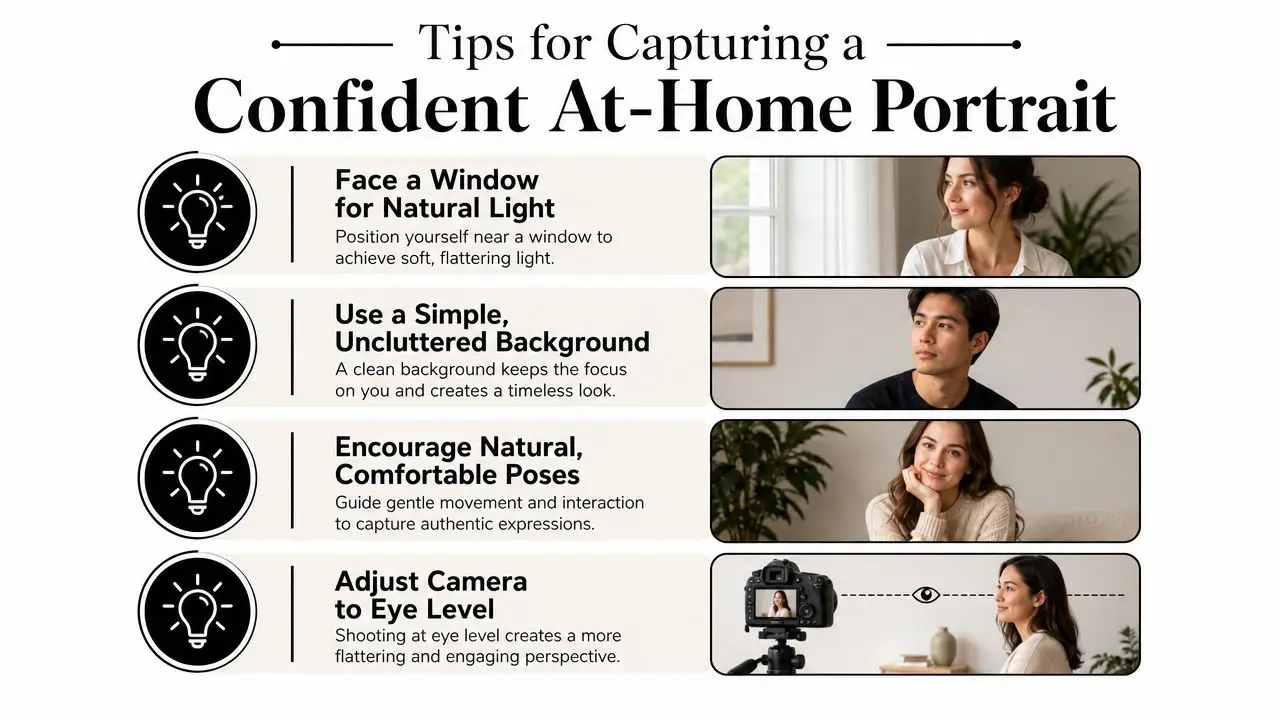
Window light is your best friend. Have the child face a window rather than stand with the window behind them, because that gives the face even light and avoids a dark silhouette. Choose a simple background, like a plain wall or tidy bookshelf, so the eye lands on the child first.
Camera height matters more than most parents expect. If you shoot at the child's eye level, the portrait feels balanced and direct. If the camera is too high, the child can look smaller or uneasy. If it's too low, the angle can feel awkward.
Help nervous children settle
Camera-shy children usually do better when they're given something to do instead of being told to “smile properly”. Ask them to hold a favourite book, sit with shoulders relaxed, or look slightly past the camera for the first few seconds. For children with sensory sensitivities or SEMH needs, build in breaks, let them keep a familiar object nearby, and let them decide when they're ready.
Younger children often need more guidance and shorter bursts of attention. Older pupils, especially teenagers, usually want more control over pose, expression, and timing. A sixteen-year-old may prefer to choose a top they like and check the image on screen before agreeing to another shot. A seven-year-old may need a quiet voice, a small reward, and permission to be a bit silly before the picture happens.
Let the child feel some ownership. A portrait feels better when the child recognises themselves in it.
For families who want a visual checklist, this infographic is a handy reminder of the basics.
And if your child responds better to seeing the process than hearing instructions, a short demonstration can help. This embedded video gives a practical visual reference for a simple home setup.
Keep the mood child-led
The best at-home portraits rarely come from chasing perfection. They come from watching the child's energy. If the shoulders are tense, pause. If the smile feels forced, stop asking for a bigger one. A child who feels respected in the process usually looks more relaxed in the finished image, and that shows.
Ordering and Delivery Options for Every Family
Once the photo is taken, parents usually face a choice between convenience and keepsake value. Some families want a digital file they can store, share, and print later. Others still like a physical pack they can tuck into a memory box or send to relatives. Many schools now offer both, often through a portal that lets parents review the image, choose a package, and pay online.
Common package types
| Package Type | What You Get | Best For |
|---|---|---|
| Digital download | A downloadable file for personal use | Families who want flexibility and easy sharing |
| Print pack | Printed copies in common sizes | Parents who prefer something physical to keep or gift |
| Bundle | A mix of digital and print options | Households that want both convenience and keepsake value |
| Premium product | Items such as canvases or yearbook-ready options | Families looking for display pieces or special mementos |
Digital ordering is often the simplest route, especially when school communication is already happening online. Print packs suit grandparents and relatives who still appreciate a framed photo or wallet-sized copy. Bundles are useful when parents don't want to choose one format too early. Premium items can be lovely, but they're usually best treated as extras rather than the default.
For parents who like to compare print quality and product range before ordering, the 2026 photo printing guide by That Blanket offers a useful way to think about finishing, paper feel, and delivery preferences.
Practical rule: order the format that fits how your family actually shares memories, not just the one that looks nicest in the gallery.
Most portals are designed to be simple, but it helps to check how image delivery works before you pay. Ask whether downloads arrive by email, within an account, or through a private link. Also ask what happens if the image isn't quite right. A school that handles those questions clearly tends to handle the whole process more confidently.
Making School Photos Accessible and Inclusive
Not every child can show up on the day, and not every child wants the same type of photo experience. That is not a problem to fix, it's a reality to plan for. Online school photos work best when they leave room for children with SEN or SEMH needs, medically absent pupils, and families whose schedule doesn't match the standard timetable.
Flexibility matters more than perfection
Some children do better with a slower booking window, a separate time slot, or a self-submission option. Others need a parent or familiar adult nearby for reassurance. A child who finds cameras overwhelming may do better with a quieter home-based setup than with a live session that feels too exposed. The point is to reduce friction, not force everyone into the same template.
That flexibility also helps learners who miss the scheduled day. If a child is ill, away, or otherwise unavailable, late booking or make-up options can stop them feeling as though they've been left out of a shared school moment. That matters emotionally, because a missed photo can feel like a missed place in the community.
The same principle applies to families in different time zones or those juggling unusual routines. A system with more than one access route is usually kinder, and kindness is part of inclusion. For more about how schools can think about inclusive design more broadly, this universal design learning resource connects well with the idea that access should be built in, not added later.
Inclusion can look creative, not clinical
Some families use a photo day that feels more like a celebration than an appointment. Others choose a relaxed portrait at home and then turn it into a keepsake with a custom print or poster. If that sounds more like your child, a service such as personalized family portrait posters can be a thoughtful reminder that school images can become something warm and personal after the session is over.
The point is simple. A child should not be punished by the photo process for being anxious, absent, or differently abled. If anything, online systems should make it easier to include them, not harder.
Sample Communications and Answers for Parents
A clear message from school can calm a lot of nerves before photo day. The tone should feel welcoming, not bureaucratic.
“Your child's school photo will take place online this Friday between 9.00am and 3.00pm. You'll receive a private booking link, simple setup instructions, and details of how the image will be stored and used. If your child cannot attend live, please let us know and we'll arrange an alternative option where possible.”
FAQ style answers parents actually want
“Can I opt out of some uses but not others?”
Yes, if the school's policy allows it. Ask whether the image is used only for your private order, or also for newsletters, social media, or promotional material.
“How do I request deletion?”
Ask the school or photographer for the retention and deletion process in writing, then follow the named contact route in the policy.
“What if I'm worried about privacy?”
Raise the concern early and ask for the consent wording, storage details, and sharing controls before the photo is taken.
A good school answer is specific. It tells you who holds the image, why they hold it, and what happens next.
The clearest schools also give parents something to keep on file, such as a short consent form or a photo and video policy that explains how images are used, where they are published, and how long they are stored. If that information is missing, ask for it. Your child's image deserves the same care as any other part of their school record.
If you're choosing an online school and want a place that understands how family life, privacy, and student wellbeing fit together, visit Queens Online School. It offers an inclusive British curriculum with live teaching and strong support for learners who need flexibility, including children who benefit from a calmer, more personalised approach to school life.