

If you search for advice on interactive video lessons, you'll find the same confident formula repeated everywhere: bolt a quiz onto the video, drop a poll into the middle, add points and badges, and engagement will follow. It sounds sensible. It's also why so many families end up disappointed.
The assumption underneath is that interaction is a feature of the software. It isn't. Interaction happens when a teacher asks a question and then does something with the answer, names the misconception, changes the next five minutes, and comes back to the child who went quiet. Software can carry that exchange. It can't supply it.
Clicks, polls and gamified video don't automatically include a child. A lesson includes a child when live teacher talk, a required response and a recording each have a distinct job around that child's confidence. When that division of labour is right, online school feels like being taught. When it's wrong, the child is watching and clicking and disappearing, all at once.
The test worth keeping in your head is emotional rather than technical. Does the lesson lower the child's fear of being wrong and invite them in, or does it only add clicks?
Why a Child Needs More Than a Video
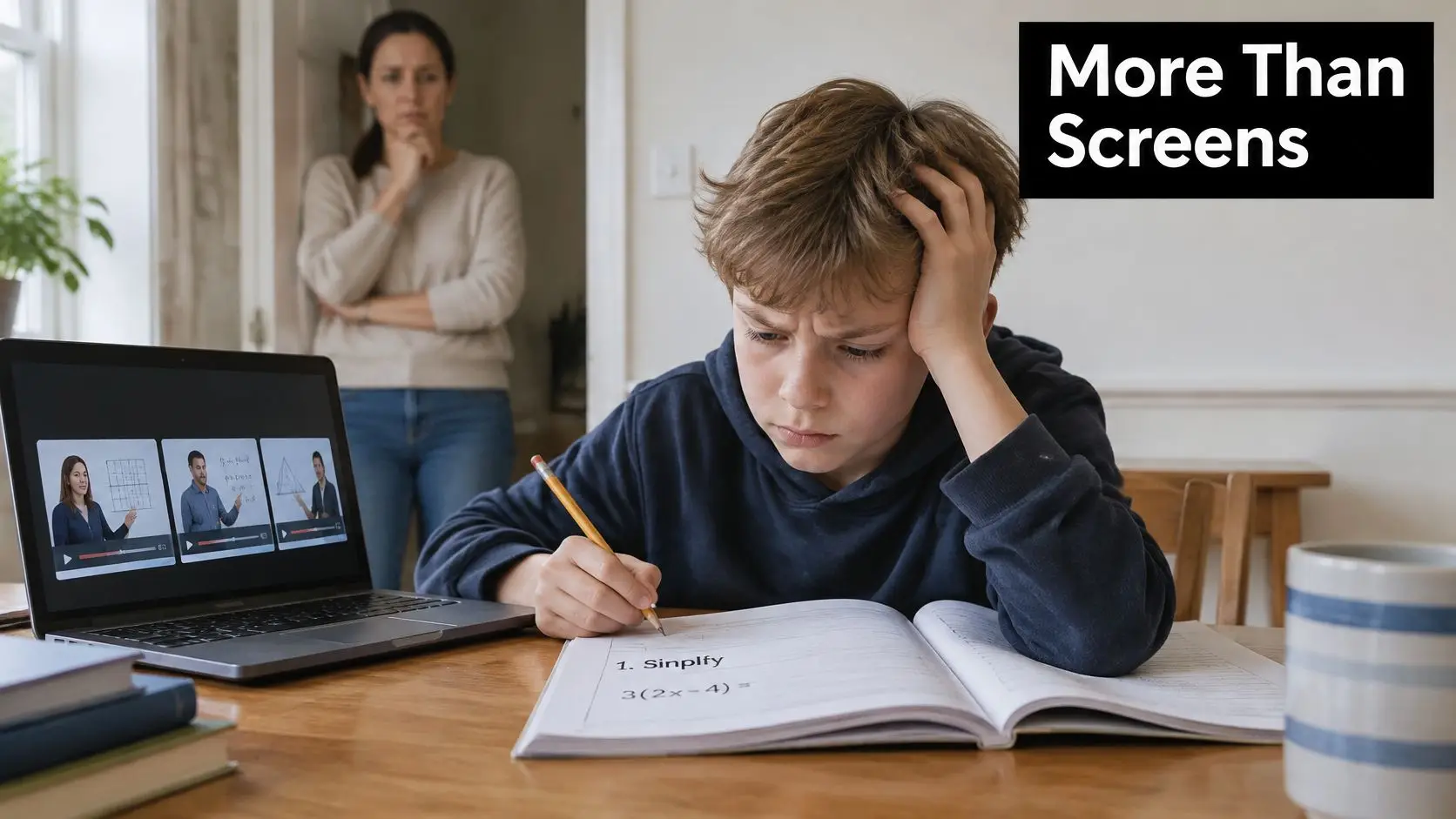
Say a Year 6 child has watched three maths videos on long division this week. She followed each one while it played, nodding in the right places. Then the screen closes, the exercise book opens, and she can't start question one. Her parent looks at the empty page and wonders whether online school is just a screen with homework attached.
That gap is where the definition earns its keep. An interactive video lesson is a short audiovisual explanation tied to something the child has to do: answer, say a sentence aloud, mark a diagram, try the next step of a worked example. Someone, whether a teacher in real time or a lesson designed in advance, then responds to what the child did, and that response changes what happens next. A recording that only plays is not yet interactive. It's a good explanation with nobody on the other side of it.
The picture below is the one parents describe most often: a child at a laptop, doing her best, with no way for anyone to see where it stopped making sense.
In 2026 this is practical rather than philosophical. Primary children need to keep moving through the curriculum, teenagers need evidence they can carry into exams, and both need something harder to measure: the feeling of being noticed by an adult who knows their name and remembers last Tuesday's mistake.
Three formats sit on the table, and they're not interchangeable. Passive recorded video is a film: the child can pause and rewind, but nobody sees a wrong answer. Question-embedded video asks something back and gives feedback, which is a genuine step up for practice. Live teacher-led lessons put a person in the room who can question, wait and adapt on the spot. By the end of this piece you'll be able to judge which mix of live talk, checks and catch-up recordings fits your child, including a child who is anxious, easily distracted, or often away for sport or a performance.
How Live Talk Feedback and Recordings Fit Together
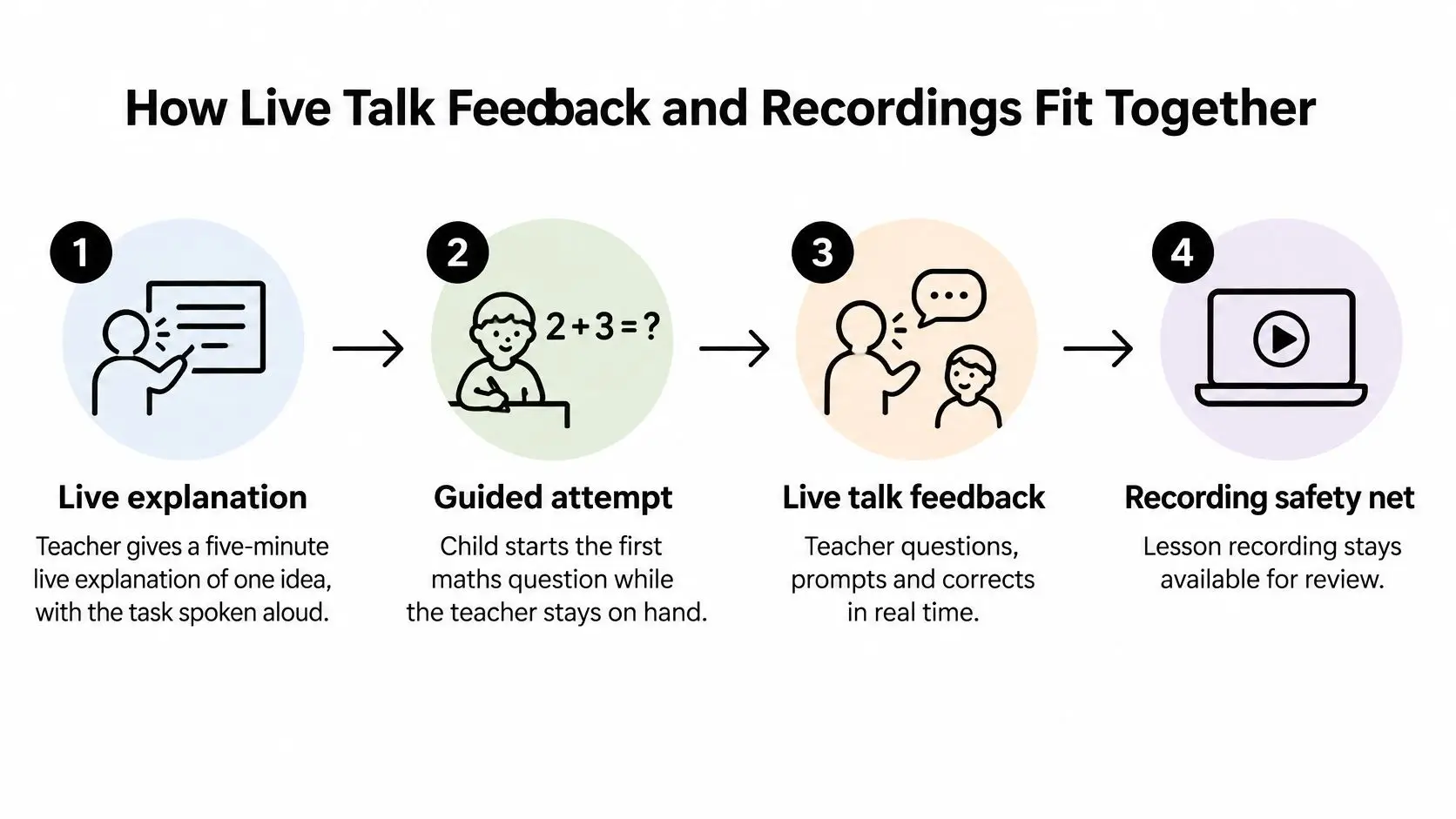
Treat the lesson as a conversation with a safety net rather than a film. One lesson on equivalent fractions runs in this order.
Seven moves, in sequence
- Five minutes, one idea, said and shown. The teacher explains a single idea and speaks the task aloud as well as displaying it. A child who reads slowly, or who is listening in a noisy kitchen, still knows what to do next.
- A worked example and a required move. The example appears and every child submits the next step, by poll or on a shared whiteboard. A private submission option matters here, because a child who has learned that being wrong in public is expensive will take the private door and give you an honest answer.
- The misconception named, not the child. The teacher says the common error out loud straight away without attaching it to a name. Half the class relaxes, because they thought the same thing.
- Only the muddy part replayed. Thirty seconds, redrawn or replayed, instead of the whole clip again. Attention survives a short repeat. It doesn't survive a full rewatch.
- A second try with one personal prompt. The child attempts it again with a nudge aimed at their specific error, and only explains aloud once the idea has held.
- The check stays inside the lesson. Coursework, quizzes and the other ongoing assessment happen as part of the lesson rather than as a lonely evening task, which is how we run them. That check changes what the teacher does next, which is formative assessment in its plainest form.
- The safety net stays open. The recording, the resources and a way to message the same teacher remain available afterwards, for illness, travel, or the question that arrives at nine in the evening.
Nothing in that sequence depends on a leaderboard. Here's how the four stages look as a flow.
What the evidence says about making a child act
A UK government evaluation of teacher-led randomised trials found measurable benefits when pupils were expected to do something with feedback. In one engagement trial, pupils expected to interact with teacher feedback reached a median engagement score of 3.5, against 3.0 in the control condition, a statistically significant difference at p=0.008. In a separate feedback study of 231 pupils, the overall positive effect was small but significant at r=0.218, moderate for 43 disadvantaged pupils at r=0.308, and r=0.37 among 40 SEND pupils (UK government feedback evaluation). The same evaluation reports earlier evidence linking digital technology with approximately four months of additional progress over an academic year, though outcomes depend on how well the technology is joined to teaching rather than parked beside it.
The test that matters: compare your child's first answer with their second. If nothing changed between the two, the lesson broadcast rather than taught.
What the recording is for
A recording does three jobs, and they're worth naming precisely. It gives back a lesson lost to illness, travel or a clashing rehearsal. It lets a child replay the thirty seconds that didn't land, at their own pace, without asking an adult to repeat themselves for the fourth time. And it lets a late question get answered in the morning. Students can also reach teachers through virtual office hours and a messaging system between classes, with the same teacher across the term rather than a rotating stranger.
Group work matters too. Virtual breakout rooms and shared presentations give classmates a real job to do together, and belonging tends to come from those small collaborations rather than from a whole-class call. Younger children need an active break built into the session rather than bolted on at the end, because a six-year-old's attention doesn't stretch through a forty-minute explanation however good it is.
Watch time is not the success measure. A changed answer is.
What the Evidence Says About Learning Gains
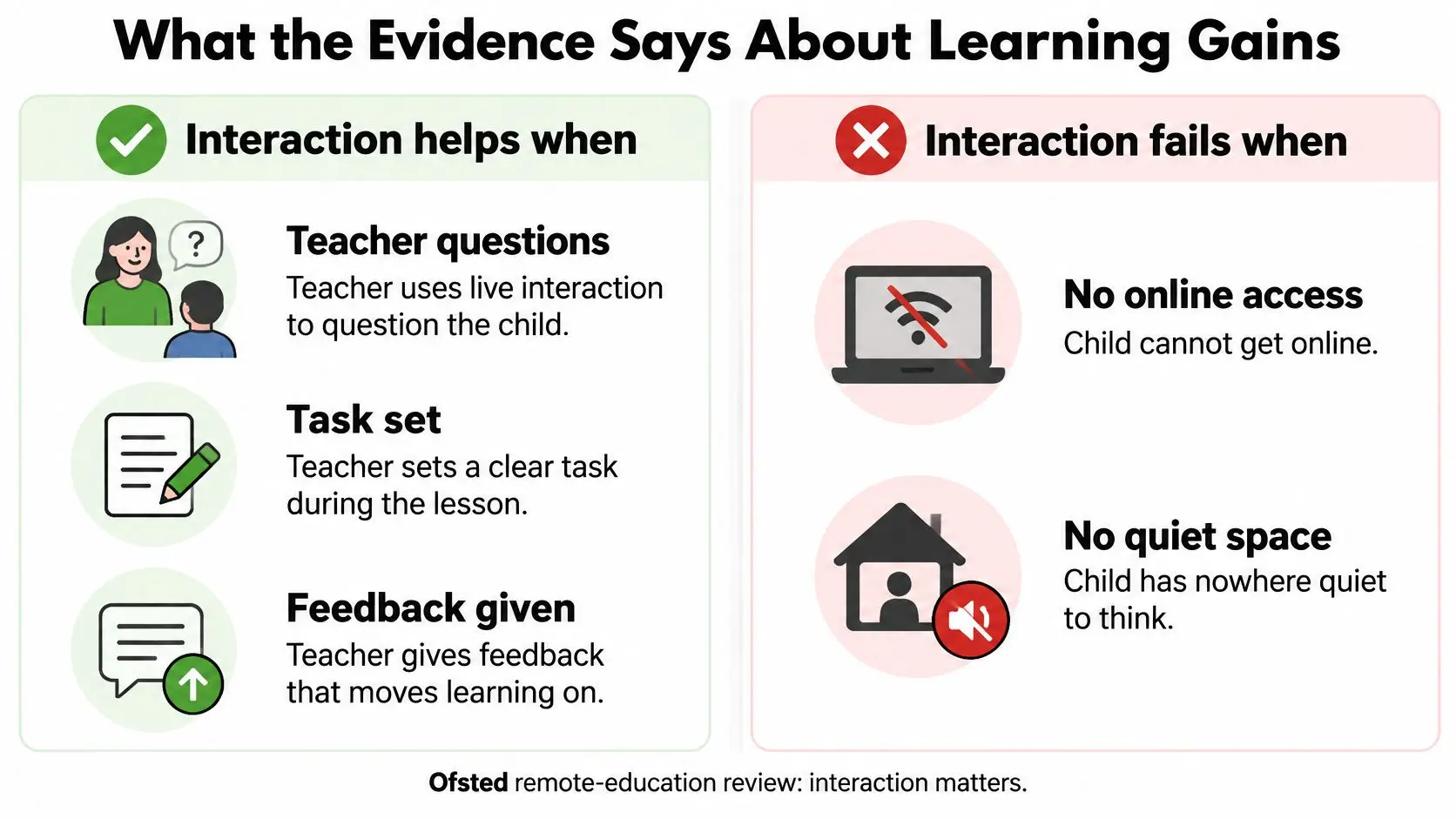
Clicks, polls and points on a screen do not automatically draw a child into learning. Progress depends on what happens around each response: a teacher explains, the child tries, and someone helps them see what to do next. A recording can support that process, but it cannot replace the live exchange.
The condition that comes first
Ofsted's national remote-education research, based on responses from 1,003 teachers and 2,020 parents, describes effective practice as combining digital explanations with questions, tasks and feedback (Ofsted's remote education research). The report gives interactive questions during a live lesson as one example. It also describes recorded lesson segments followed by an interactive chat, a task and feedback as an approach that can sometimes prompt more interaction than a live lesson alone.
The lesson is not the video by itself. A recording followed by a question gives a child time to think; a teacher's reply helps them understand whether their thinking is on track. Without that response, a polished video may hold attention without moving learning forward.
Who the lesson actually reaches
Even a well-designed lesson can miss a child who cannot get online or find a quiet place to work. Access shapes whether the child can hear the explanation, attempt the task and respond.
A shared laptop, a busy kitchen table or an unreliable connection can make participation harder. Those obstacles do not measure a child's ability. They affect how much of the lesson the child can take part in, and whether they can ask for help when they get stuck.
The questions worth asking a school
Look for three distinct jobs in a lesson: the teacher explains, the child gives a response that shows their thinking, and the teacher responds to it. A poll can collect an answer, but it does not by itself tell a child why that answer works or what to try next.
Ask how a child can join if their connection is weak. Check whether lesson materials can be accessed in a lower-bandwidth format and whether instructions are spoken as well as written. These details help a child stay involved when streaming or reading is difficult.
Evidence about remote learning is not a promise that every video product will improve progress. The value comes from teaching that gives the child a real part to play, with feedback that helps them take the next step.
Lessons Built Around One Child's Needs
Three children, three design choices. None of them needs a cleverer platform. Each needs an adult who has thought about how the lesson will feel from the inside.
The child who needs the door held open
UK government research found that children with special educational needs and disabilities experienced poorer wellbeing, greater anxiety, lower learning engagement and more difficulty thinking about how they learn than peers without SEND during the 2021 autumn term (children and young people's mental health surveillance report). That changes the first two minutes of a lesson. It opens with a private mood check, captions and a visual instruction, then a five-minute explanation, a choice of two activities, and an individual check-in before any sharing happens. The child can answer by chat, audio, a poll or a low-pressure reaction button, so speaking in public is an option rather than a test.
The child whose attention runs out at twelve minutes
A nine-year-old can hold on through a short explanation and then needs to move. So instructions are spoken as well as written, the task uses a large labelled button rather than a paragraph of text, and an active break sits inside the live lesson instead of at the end of it. Primary-aged students at Queen's Online School have those breaks built into their lessons as standard.
If you want to see how teachers build questions into a video without losing the thread of the explanation, LearnStream's interactive lesson advice walks through the mechanics from the teacher's side. What matters when you watch a sample is whether the questions interrupt the story or carry it forward.
The child who isn't there at all
A teenager in another time zone, or one at an audition on a Tuesday morning, misses the live class. The same lesson is recorded, the resources stay open, and the pace, task and support shift towards that learner's goals instead of forcing every child through identical live hours. That's what a personal learning plan is for in practice: the plan bends around the child rather than the timetable, and a missed week becomes a catch-up route rather than a hole in the year.
There's an emotional layer here that's easy to miss. The same government surveillance report noted that children without a home computer showed greater increases in mental-health symptoms during school closures than children who had one. A working device and a quiet corner are emotional support as much as they are a login.
Ask to see this: where a child can answer privately, where the pause sits, who checks in on them by name, and what happens on the day they come back after missing a week.
When Screens Worry Parents
Start with the worry rather than the reassurance. In the government's cited parental research, 96% of parents believed their child benefited from being online, yet fewer than three in ten believed the benefits outweighed the risks for social media, messaging and video-sharing platforms (Growing up in the online world progress statement). Those two numbers belong together. They describe a parent who isn't anti-technology but won't hand a child an open door.
A protected lesson with a known teacher, clear participation rules and a purpose is a different kind of online time from an open video app.
The table below answers the common worries with design decisions rather than slogans. The concerns come from a Department for Education survey that asked parents directly about education technology (parent voice survey).
| Worry | Who raised it | What the lesson should do |
|---|---|---|
| Less time with a real teacher | 57% of primary parents and 53% of secondary parents | Keep new teaching live, with questions and the same teacher available afterwards |
| Too much screen time | 46% of primary parents and 41% of secondary parents | Use short explanations, an off-screen task and a built-in break |
| Unfair access to technology | 25% of primary and secondary parents | Offer captions, spoken instructions and a lower-bandwidth or downloadable recording |
| Risks of open video and messaging platforms | Fewer than three in ten parents say benefits outweigh risks there | Use a known teacher, moderated chat, controlled sharing and a named adult |
A science lesson shows how that looks in motion. Pupils type into a moderated chat, the teacher controls who shares a screen, an anxious child answers privately, and the session closes with a simple wellbeing check instead of rushing straight into the next task.
Children with additional needs may need more than that, because UK evidence indicates they're more likely to have negative online experiences. Add predictable routines, captions, a private response option and an explicit anti-bullying expectation, and make sure a named adult can step in when a child feels overwhelmed. Then ask any provider the three key questions: who sees the chat, what happens when a child is unkind, and who responds when a child is struggling. We set out why our online classes work the way they do for exactly those questions.
Choosing the Right Interactive Video Lesson
Start with this week's real need rather than a school's homepage. The table separates the three formats by what your child does in them.
| Format | What the child does | Best when | Risk if used alone |
|---|---|---|---|
| Passive recorded video | Watches, pauses and rewinds a teacher explanation | Catch-up, revision and a different time zone | No one notices a stuck or upset child |
| Interactive asynchronous video | Answers embedded questions or a short task, then sees feedback | Practice after teaching, retrieval and mastery checks | Clicks replace conversation and belonging |
| Live teacher-led lesson | Asks, discusses, polls, collaborates and retries with a teacher present | New content, anxiety, SEND support and staying with the year group | Fatigue if the session has no break or private way to answer |
When passive video is genuinely the answer
Catch-up and revision are real teaching jobs, not leftovers. A child rewinding the exact explanation she half-heard on a Sunday evening, without asking an adult to repeat themselves for a third time, is learning independently. A recording of a teacher she knows also keeps the voice familiar during a long illness. What passive video can't do is notice confusion, and a child who is stuck at nine on a Sunday night needs the next morning's conversation more than another rewatch.
When embedded questions earn their place
Questions inside a video are at their best after teaching, not instead of it. A short check tells the teacher who needs the second example in tomorrow's lesson and who is ready to move on. Retrieval practice, low-stakes repeats, and quick mastery checks all fit here. Gamified elements can keep a tired child going through a dull but necessary drill, and that's a fair use. What they can't do is create presence. A quiz score is not a relationship, and a streak counter doesn't notice that a child has gone quiet.
When the live lesson has to carry the weight
New fractions, a first science practical, a nervous return after three weeks away: these need a person who can ask, wait and adjust. The child asks a question mid-explanation, hears a classmate's wrong answer corrected kindly, and tries again while the idea is still warm. The risk at the other end is fatigue, which is why a session without a break or a private way to answer will lose the very children it was meant to include.
Good signs and poor ones
- A qualified teacher who is present, not a facilitator reading slides while someone else owns the teaching.
- A private route to being wrong, so a child can attempt an answer without an audience.
- A break for younger children, built into the lesson rather than offered afterwards.
- The same adult to message afterwards, which is what makes a missed lesson recoverable.
The poor version is easy to spot once you know it: a library of videos with automated scores, a chat nobody moderates, lessons that are technically live but silent, and nobody on the staff who knows how your child takes feedback.
No amount of clicking replaces the moment a teacher says your child's name and asks what they were thinking. Secondary students at Queen's Online School attend 26 live, teacher-led lessons each week, taught by fully qualified UK teachers, with every lesson recorded for catch-up and revision.
Before you decide, sit beside your child in one sample live lesson and watch what happens when an answer is wrong. Does the teacher name the error and move on, or does the room go quiet? Ask how a missed lesson is recovered, and who answers a question that arrives at nine in the evening. Then look at your child's face at the end of the session. Relieved or rushed will tell you more than any brochure.
Queen's Online School teaches the British curriculum through live, teacher-led lessons in small classes, with fully qualified UK teachers, recordings of every lesson and the same teacher across the term. If you're working out how much of your child's week should be live, how much should be recorded and how much should be practice, you can see how the timetable runs and where the catch-up route fits at Queens Online School.