

A virtual classroom is a live, teacher-led online lesson where children can see, hear and interact with their teacher and classmates in real time. For many families, that becomes the question at the kitchen table after another hard school morning, when you're wondering whether your child needs a different kind of day, not just a different school name.
That worry is usually very simple, even if the technology sounds complicated. You're really asking, will my child learn, belong and feel safe if lessons move online?
The Moment a Parent First Searches for a Virtual Classroom
A parent often arrives here after weeks of small frictions that have started to feel big. Mornings take too long. The school gate feels heavier every day. Your child may be anxious, bored, excluded, overwhelmed, or worn out by a routine that no longer fits.
In that moment, virtual classroom can sound like a technical fix for a human problem. It isn't really about software first. It's about whether a child can keep learning without losing confidence, connection or dignity.
A live virtual classroom is a real lesson, not a bundle of worksheets and not a link to a recording. It's a scheduled class with a teacher, classmates, questions, feedback and a rhythm that children can depend on. That matters because the child is not just staring at a screen, they're still part of a lesson.
Practical rule: if the online option removes pressure without removing teaching, it may be worth exploring. If it removes teaching as well, it's probably not the right fit.
Parents usually want one honest answer before anything else. What is virtual classroom learning really, and what kind of child does it suit? The rest of this guide stays with that question, because the right answer depends less on screens and more on the child sitting in front of you.
What a Virtual Classroom Is
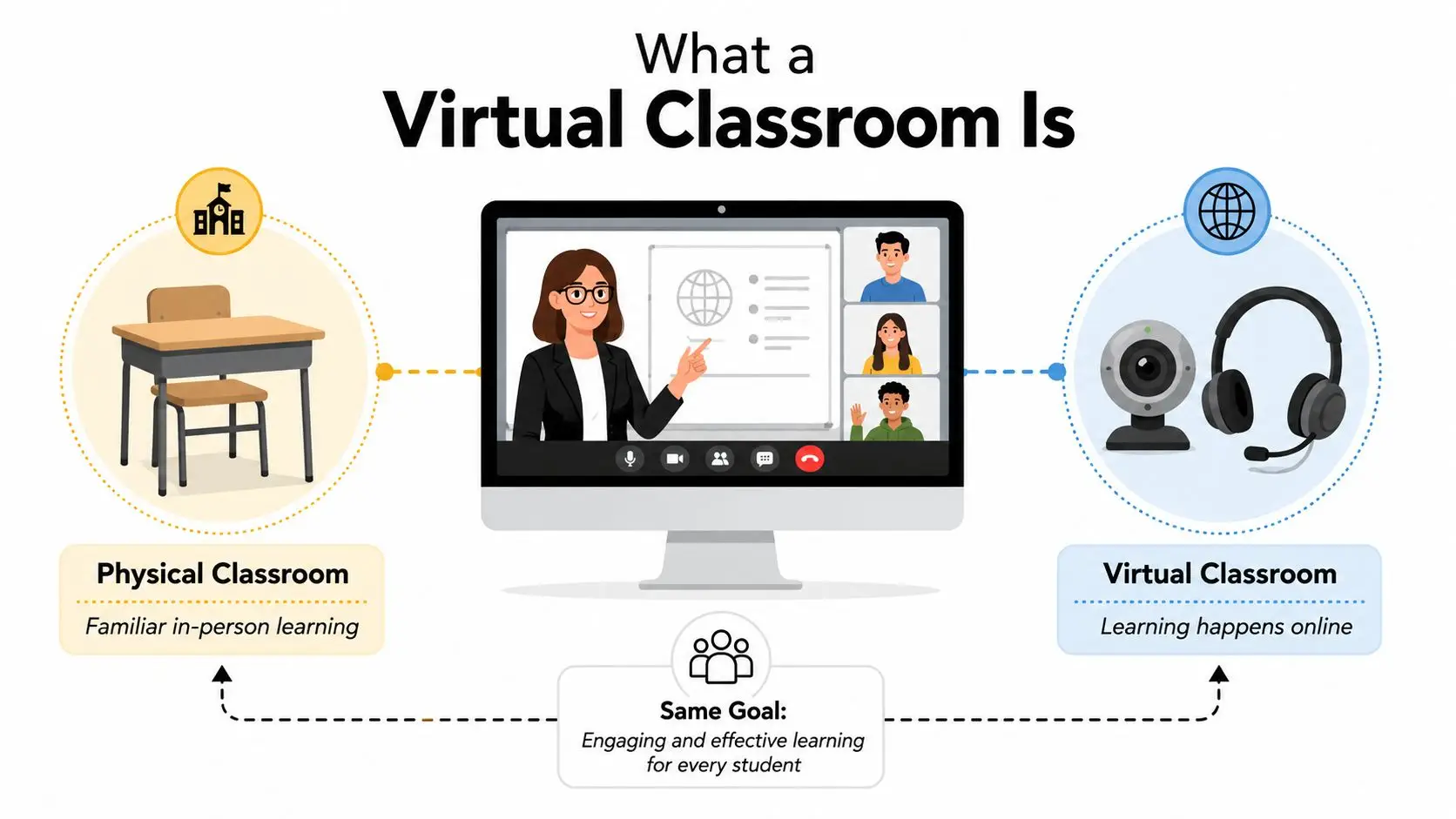
A virtual classroom is easiest to understand by comparing it with a normal lesson. In a physical classroom, children arrive, greet the teacher, listen to the explanation, answer questions, work with peers and leave with homework or follow-up. In a virtual classroom, those same parts are still present, but they happen through a screen, in real time, with live interaction.
The key difference is synchronous teaching. The lesson is scheduled. The teacher is present. Children can speak, type, respond to polls, share work and ask for help while the lesson is happening. That live element separates a true virtual classroom from a self-paced app or a bundle of pre-recorded videos.
A recording is like a film of the lesson. A virtual classroom is the lesson itself, delivered through a digital doorway. The whiteboard, the teacher's voice, the raised hand and the quick question from the back row still matter because the class is still unfolding together.
Parents often meet the term alongside wider online learning language, and that can blur the picture. A useful explanation of the difference between a virtual learning environment and live online teaching is available in this guide to virtual learning environments, and it helps separate the platform from the classroom experience.
What happens in a real lesson
A child logs in, checks audio and camera, and joins the class at the set time. The teacher opens with a welcome, sets expectations and teaches the topic step by step. Then there is discussion, independent work, feedback and a clear finish.
That structure matters. Children do not just need content, they need a sense that the day still has shape.
How a Live Virtual Lesson Runs from Start to Finish
A strong live lesson feels calm, not chaotic. The school handles the technical set-up, so the family should not have to improvise the classroom every morning. For younger children, that predictability can be the difference between settling in and shutting down.
The technical side matters because the lesson has to stay live, responsive and clear. Modern virtual classrooms often use SFU-based WebRTC with simulcast, so each learner uploads one layered stream at roughly 1.5–2 Mbps, while the server forwards only the layers each receiver can decode. That setup reduces aggregate downlink to about 6–10 Mbps per student instead of the 24+ Mbps a naive 1080p mesh design would require, which is why SFU is often favoured for classes of around 30 students (Forasoft).
A good lesson is not judged by jargon, though. It is judged by whether the child can hear the teacher, answer a question and stay connected without constant friction.
A GCSE science lesson, step by step
A child logs in at the set time and checks sound, camera and materials. The teacher greets the group, takes attendance and opens the shared board. Then the lesson moves into explanation, questions and small-group discussion, with the teacher dropping into conversations as needed.
The sequence matters because children need to know what happens next. A clear start lowers anxiety, and a clear rhythm helps the child stay with the lesson even when the topic feels difficult.
The strongest virtual lessons feel organised enough to reduce anxiety and interactive enough to keep attention.
A short recording or follow-up resource usually supports revision and catch-up later. That helps children who were absent, needed extra time, or want to revisit a tricky part of the lesson. The point is not to replace the live class, it is to protect learning when the day does not go perfectly.
For a closer look at how live delivery is supported in practice, Queen's Online School's virtual classroom technology overview explains how interactive classes are structured in practice.
The Core Features That Make a Virtual Classroom Work
A virtual classroom works when teaching, interaction and safety all pull in the same direction. If one of those parts is weak, the child feels it straight away. A clever platform with poor teaching still feels empty, and a warm teacher with weak systems still leaves children exposed.
Teaching quality first
Subject-specialist teachers matter because children need more than enthusiasm. They need someone who can explain clearly, check understanding and adjust pace in the moment. Small class sizes help because the teacher can notice hesitation before it turns into silence, and real-time feedback stops children from drifting.
That matters especially for pupils who need routine. A predictable live lesson, with the same adults and clear expectations, can feel steadier than a large room where nobody notices a child is struggling. It also supports exam-track learners, who often need precise correction rather than general encouragement.
Community and wellbeing matter too
A virtual classroom should make room for belonging, not just attendance. Clubs, social events, mindful routines and respectful peer contact help children feel known, especially when they have had a hard time in mainstream settings. A zero-tolerance attitude to bullying matters because online spaces can become unsafe very quickly without firm adult oversight.
Parents often ask whether a child can feel part of a school community through a screen. The answer depends on what the school builds around the lessons. If there are chances to talk, join activities and be seen by adults who know the child well, the experience can feel much more human. If the platform is only a place to log in and listen, the child can feel like a name on a register.
Infrastructure underpins the day
Low-latency design matters because a child cannot follow a lesson well if voices keep cutting out or replies arrive too late. The UK telecom and education design rule of thumb based on ITU-T G.114 treats 150 ms one-way delay as the upper limit for satisfactory voice quality, so routing and media paths need to support real-time interaction (Learning Systems Authority). That is also why good platforms include attendance, recording and analytics instead of behaving like generic conferencing tools.
A school or provider that explains its live lesson design clearly is easier to trust than one that only shows polished screenshots. Parents do not need technical jargon, they need to know whether the system will help their child hear the teacher, answer back and stay connected without constant interruption. For a detailed look at the platform side of that picture, this overview of virtual classroom technology is a useful companion.
Virtual, In-Person and Hybrid Schooling Compared
Families often want a neat answer, but it is more practical than that. The right model depends on the child's attendance history, confidence, learning style, health, exam stage and home circumstances. A virtual classroom can be a strong match, but it isn't automatically the best answer for everyone.
| Criterion | Virtual Classroom | In-Person School | Hybrid School |
|---|---|---|---|
| Daily rhythm | Live timetable from home, often steadier for children who struggle with travel or transition | Fixed school day on site, with strong physical routine | Mix of home and campus days, which can help some children but confuse others |
| Social interaction | Real-time interaction online, with chat, discussion and group work | Face-to-face peer contact throughout the day | Some in-person contact, some online contact |
| SEN and SEMH support | Can work well when lessons are predictable, adults are named and safeguarding is clear | Can work well when the child benefits from in-person structure and proximity | Can help some learners, but consistency can be harder to maintain |
| Specialist teaching | Can connect families to subject specialists regardless of location | Depends on local staffing and provision | Often uneven across subjects and days |
| Exam preparation | Strong when live lessons, recordings and assessment are organised | Strong when school systems are established | Can support revision, but continuity varies |
| Safeguarding | Needs clear online moderation, reporting routes and adult oversight | Built into the school environment | Must cover both spaces carefully |
| Parent role | Parents may need a greater day-to-day awareness of progress and routine | Less direct involvement in the school day | Shared responsibility between home and school |
A Year 6 pupil with SEMH needs may do better with a calmer start, smaller interactions and fewer transitions. A GCSE retaker may need live teaching, recordings and targeted feedback to rebuild confidence. An international family may value continuity of curriculum during travel or relocation, especially when school choice has to match moving plans.
For some children, though, in-person school still wins. If they need constant physical reassurance, a very structured environment outside the home, or intense social contact to stay motivated, online learning may not meet that need well.
If you're weighing up formats, this guide to virtual schooling can help you compare the broader model before you commit.
Who Thrives in a Virtual Classroom and Why
A virtual classroom tends to suit children who need teaching to feel more manageable, more predictable or more flexible than a traditional school day allows. That doesn't mean they're fragile or behind. It means the format fits the child's current needs better.
A Year 6 pupil with SEMH needs
For a child with SEMH needs, the best virtual lessons are often the ones with clear starts, clear ends and adults who are easy to recognise. They may settle better when they know exactly who will greet them, what the lesson will look like and how to ask for help without drawing attention to themselves.
That child may not need more freedom. They may need less uncertainty. A calm live classroom with structured participation can reduce the pressure that comes from crowded corridors, unpredictable social moments and the fear of getting things wrong in public.
A GCSE retaker
A teenager preparing for GCSEs usually needs sharper teaching, faster feedback and consistent expectations. Live lessons help because the teacher can correct misconceptions immediately, not days later when the moment has passed. Recordings also help with revision and confidence, especially when a student needs to revisit a hard topic more than once.
A GCSE learner often does better when the day still feels like school. Timetable structure, subject specialists and regular contact can stop isolation from turning into drift.
An international family
Families moving between countries often want continuity as much as convenience. A British curriculum delivered online can preserve academic direction while allowing travel, relocation or family commitments to stay in the picture. The child still needs community, though, not just access.
Practical rule: if the child benefits from predictable teaching and you can create a quiet study space at home, a virtual classroom may work well. If the child needs constant in-person regulation from adults outside the home, it may not.
Children do best when the format matches their learning needs, not when the label sounds modern. That's why the question is never just whether virtual learning exists, but whether it helps this child stay engaged, safe and hopeful.
Evidence, Accreditation and Safeguarding in the UK Context
Parents usually ask two things once the basics make sense. First, is the qualification recognised? Second, is my child safe online? Those questions are sensible, and they deserve direct answers.
For accreditation, the important point is not the platform alone, it's the school's examination status and the awarding body behind the qualification. A provider that is a Pearson Approved Examination Centre gives families a clearer route to sitting GCSE and A-Level papers in a recognised system, which matters for university progression and for families who may move between countries.
Safeguarding has to be built into the classroom, not bolted on afterwards. The statutory guidance Keeping Children Safe in Education 2024 requires schools and colleges to have a named designated safeguarding lead and to give all staff safeguarding and child protection information as part of induction. In a virtual classroom, that translates into visible reporting routes, secure chat controls and adults who know how to respond when a child discloses distress.
Ofcom's Children and Parents: Media Use and Attitudes Report 2024 found that 96% of children aged 3-17 in the UK went online in 2024, and among 8-17s who used messaging or social media, 44% said they had encountered bullying content online (Ofcom report summary). That's why emotionally safe participation spaces matter so much in live teaching.
If you want a wider operational checklist, Keybaki assessment and parent follow-up tools is a useful resource for thinking about follow-up, monitoring and parent communication in online learning settings.
A careful parent doesn't need a sales pitch here. They need a school that can explain who teaches, who watches for risk, how concerns are escalated and how exam recognition works in practice.
Your Next Steps and How to Choose the Right Virtual Classroom
Start with your child, not the platform. Think about whether they need steadier routines, smaller groups, subject expertise, emotional safety, exam support or more flexibility around family life. The right choice should ease pressure without lowering expectations.
Use a simple checklist when you speak to any provider:
- Live teaching: Ask whether lessons are scheduled in real time, with opportunities to ask questions and get feedback.
- Subject specialists: Check who teaches each stage and whether the teachers know the curriculum well.
- Catch-up support: Find out whether lessons are recorded and how pupils use them later.
- Class size and pace: Ask how many children are in a group and how the teacher spots when someone is struggling.
- Safeguarding: Ask who the named designated safeguarding lead is and how concerns are reported.
- Wellbeing: Look for a clear anti-bullying policy, secure chat controls and thoughtful moderation.
- Accreditation: Check whether the school is an exam centre and how GCSE or A-Level recognition works.
- Community: Ask how pupils meet one another beyond lessons, through clubs, tutorials or events.
Queen's Online School is one option for families looking for live interactive classes within a British curriculum, with small class settings, recorded lessons, support for SEN and SEMH learners, and Pearson Approved Examination Centre status. It sits within the Cambridge Online Education Group, and its model may suit families who want a structured online school rather than a patchwork of separate tools.
The core question remains personal. The right virtual classroom is the one where your child can learn, belong and feel safe, and the only honest way to find that out is to talk to a school that can explain how its day works.
If you'd like to see what that looks like in practice, visit Queens Online School and speak with a team that can walk you through live classes, safeguarding, exam support and the day-to-day rhythm of online learning for your child.