

Your child is logged in, the task has appeared on screen, and the words group project land with a thud. Some children brighten immediately. Others go quiet. Many parents feel both reactions at once. They can see the value in teamwork, but they also know how quickly online collaboration can slide into confusion, uneven effort, or anxiety.
That tension is real. Collaborative projects online can be energising, creative, and motivating when they're designed around the child rather than the task sheet. They can also be overwhelming if expectations are vague, tools are clunky, or support arrives too late.
For families, especially those supporting a child with SEN or SEMH needs, the question isn't merely whether online group work is possible. It's whether it can be safe, structured, and emotionally manageable. The good news is that it can. Done well, it helps children practise communication, learn how to contribute to a team, and feel that their ideas matter.
Designing Projects That Truly Inspire
A strong online project starts with meaning. Children engage when the task feels like a mission, not a worksheet split into pieces. The project needs a clear purpose, a visible end point, and roles that let each child feel useful from the start.
The projects that work best usually answer three questions quickly. What are we making. Why does it matter. What exactly am I responsible for. If any one of those stays fuzzy, motivation often drops.
Practical rule: If a child can't explain the project aim in one or two sentences, the design is still too vague.
What makes a project feel exciting to a child
Children don't usually connect with abstract instructions such as “work collaboratively to present findings”. They connect with outcomes they can picture. Build a museum exhibit. Plan a healthy lunch café menu. Debate how to improve a town park. Produce a news bulletin. Create a guide for younger pupils.
A useful test is whether the task creates emotional investment. A primary pupil may care about making a class animal fact file because it feels like publishing. A secondary student may care about a history documentary because it gives them room to argue, edit, narrate, and perform.
Practical design choices help:
- Give the project a real audience: Younger children might present to another class. Older students might share with parents or peers.
- Make the final product concrete: A podcast, slide deck, poster wall, short video, or live presentation is easier to grasp than a vague “group task”.
- Build in visible contribution: Each child should be able to point to a section, role, or responsibility that belongs to them.
- Use active learning methods: Discussion, making, presenting, and reflecting create stronger ownership than passive note-taking. This is why approaches such as active learning strategies often make online collaboration more engaging.
Online Collaborative Project Ideas by Key Stage
| Key Stage | Project Idea | Focus Skills |
|---|---|---|
| Key Stage 2 | Create a virtual habitat guide for an endangered animal | Research, speaking, turn-taking |
| Key Stage 2 | Produce a shared storybook with one chapter per pair | Creativity, sequencing, listening |
| Key Stage 3 | Design a community wellbeing campaign | Empathy, planning, persuasive writing |
| Key Stage 3 | Build a science myth-busting presentation | Evidence use, teamwork, presentation |
| Key Stage 4 | Record a panel discussion on a literary theme | Analysis, verbal communication, role ownership |
| Key Stage 4 | Develop a sustainable business idea and pitch | Problem-solving, organisation, decision-making |
| Sixth Form | Create a policy brief on a current issue | Critical thinking, synthesis, academic writing |
| Sixth Form | Produce a subject-based explainer video series | Leadership, specialist research, peer review |
These ideas work because the collaboration is built into the task. Students don't just divide up content and disappear. They need each other to shape, review, and connect the final result.
Clear objectives prevent the most common breakdown
One of the most important findings in UK higher education online group work is that “unclear objectives” are the primary failure point, and successful methodology depends on careful project design, fair assessment, and clear guidance on role allocation, as outlined in this Open University report on online collaborative projects. That principle matters just as much for younger learners.
Parents often notice the warning signs before anyone else does. A child says, “I don't know what we're supposed to do.” Another says, “I've done my bit but nobody else has.” Those comments rarely point to laziness first. They usually point to weak structure.
A practical objective should include:
The outcome
“Create a three-minute presentation explaining how rivers shape terrain.”The individual roles
One child researches examples, one designs slides, one writes the script, one presents.The checkpoints
Idea approval, first draft, peer feedback, final rehearsal.The success criteria
Accuracy, teamwork, meeting deadlines, and clarity of communication.
Children cope better with challenge when they know where the edges are.
When adults skip this stage, children often fill the gap with worry. When adults get it right, the same task feels manageable. That's what turns a group project from a source of stress into a shared piece of work a child can be proud of.
Choosing Your Digital Toolkit for Collaboration
The best tool isn't the one with the most features. It's the one that children can use confidently, that adults can monitor properly, and that fits the project without creating extra noise.
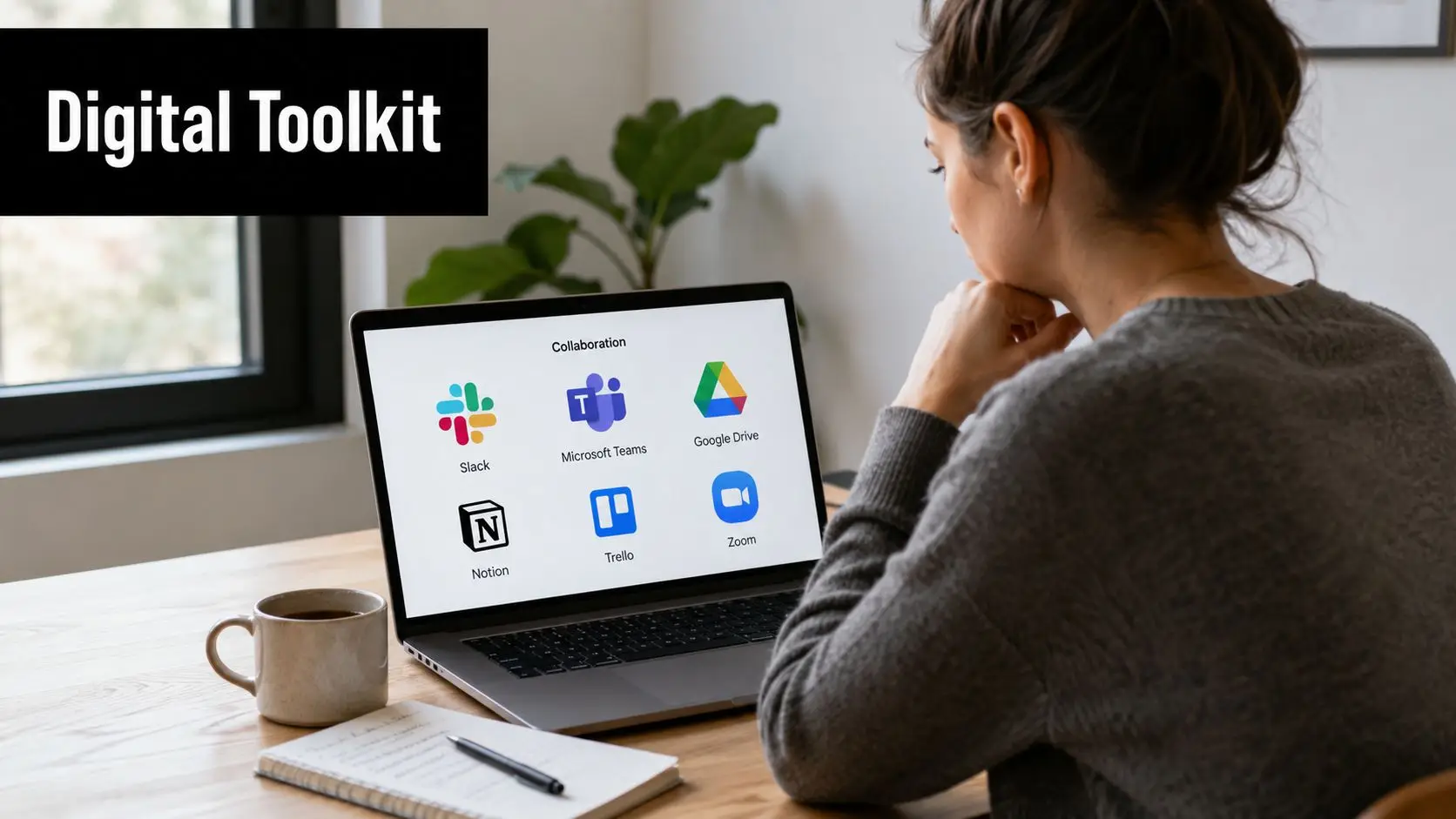
When parents see a long list of platforms, it can feel as if successful collaborative projects online require a complicated digital ecosystem. In practice, most strong projects rely on a small set of tools used consistently. Children do better when they aren't constantly switching platforms, hunting for files, or trying to remember where the conversation happened.
Choose tools using three filters
Start with these questions:
- Is it safe: Can the school monitor communication, control access, and keep interactions inside an approved environment.
- Is it easy for a child to use: Can a pupil join, contribute, and find their work without frustration.
- Does it match the task: Brainstorming, live discussion, quizzes, and shared drafting all need slightly different functions.
That framework keeps technology in its proper place. The tool should support thinking, not become the main challenge.
A useful benchmark comes from UK higher education. A 2024 study found that over 85% of instructors use Microsoft Teams as their primary collaboration tool for online projects, with Padlet and Kahoot! also used extensively to support group activities and shared digital spaces, according to this study of online collaborative projects in UK universities. That pattern makes sense because each tool does a different job well.
What each tool does best
Microsoft Teams works well as the main classroom hub. It gives students one place for live lessons, breakout discussions, file sharing, teacher messages, and scheduled meetings. For children, that consistency matters.
Padlet is excellent for early-stage thinking. A group can post ideas, images, links, and short responses on one shared board. This helps quieter students contribute without the pressure of speaking first.
Kahoot! works best as a momentum tool. A teacher can use it to check understanding before a project starts, settle misconceptions, or turn revision into a lively shared moment.
Parents who want a clearer picture of how a managed online environment supports learning often find it helpful to look at examples of virtual classroom technology in action.
Here's a short visual overview of digital collaboration in practice:
Match the tool to the child, not just the task
A lively brainstorming wall may be brilliant for one student and overstimulating for another. A live call may help one child feel connected but leave another struggling to process quickly enough. This is why good online teaching doesn't just ask, “What app should we use?” It asks, “How will this child experience this app?”
For example, a pupil who needs processing time may do better when the teacher combines a live Teams session with a quieter follow-up task in a shared document or Padlet board. A child who worries about speaking can contribute by posting ideas in writing first, then reading out one prepared sentence during the discussion.
The right digital toolkit reduces friction. It doesn't ask children to battle the platform before they can start learning.
Nurturing Teamwork Every Step of the Way
A project rarely succeeds solely from children being told to work together. It succeeds because an adult shapes the path. Good facilitation is often gentle and almost invisible, but it changes everything.
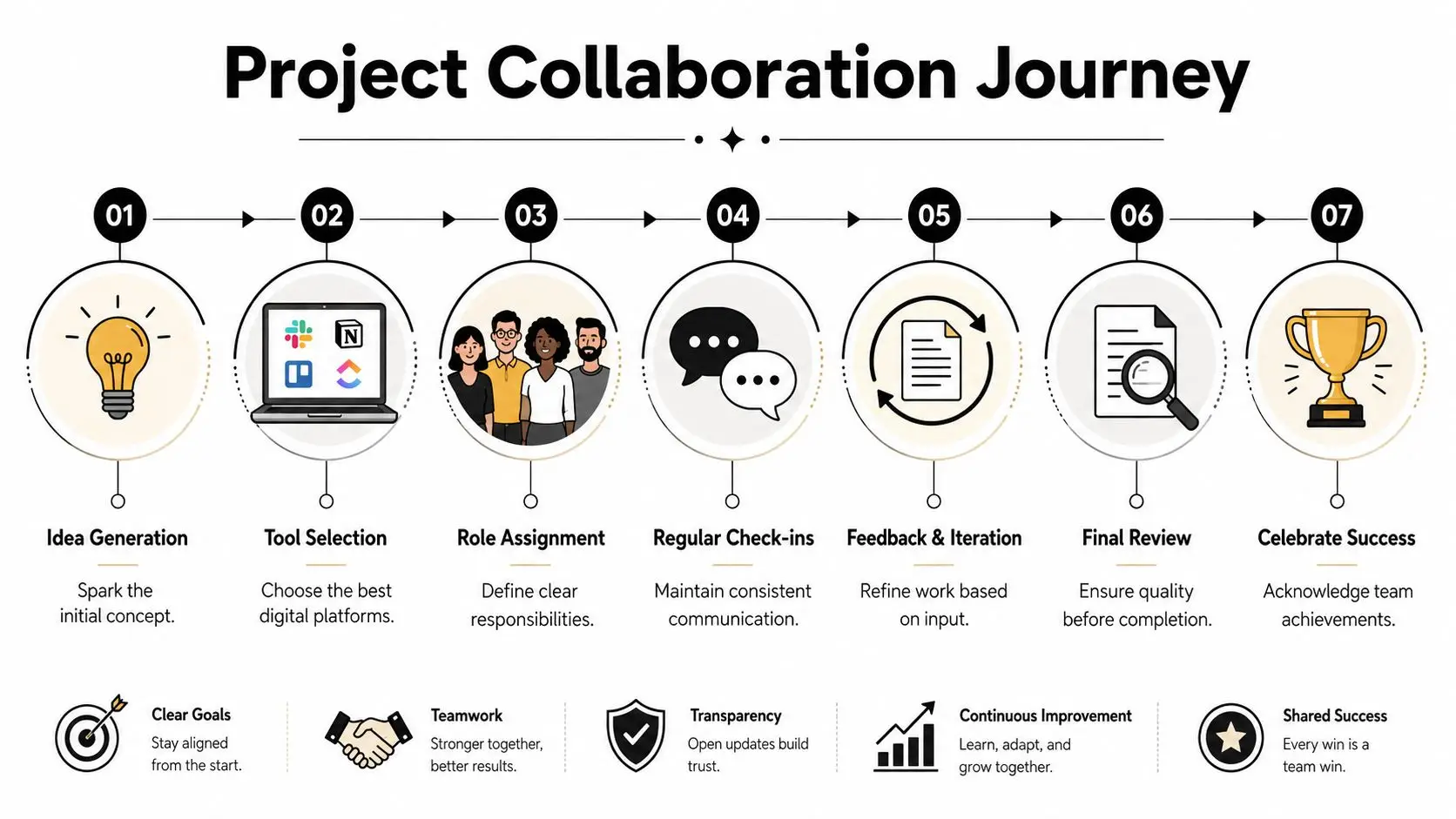
Consider a common online scenario. Four students are asked to produce a short presentation on renewable energy. At first, everyone seems agreeable. One pupil starts speaking confidently and suggests doing all the slides. Another says very little. One is enthusiastic but forgetful. One is worried about getting it wrong and keeps asking for reassurance.
How a project unfolds when support is steady
The teacher doesn't wait for problems to harden. In the first meeting, the group agrees on one narrow question rather than a broad topic. The teacher then helps them choose roles based on comfort and strength. The confident speaker becomes discussion lead, but not owner of the entire task. The quieter student collects visual examples. The anxious student checks facts against the lesson notes. The forgetful but creative pupil designs the final layout.
By the next check-in, the group has made progress, but tension has appeared. The discussion lead is frustrated that the others haven't moved as fast. The quieter student has done the work but hasn't uploaded it. The anxious student has rewritten their section several times and is stuck.
At this point, strong facilitation sounds calm and specific:
- Refocus the task: “Let's look at today only. What must be finished before the next lesson?”
- Reduce ambiguity: “Upload two images and one caption by 3 pm. That's enough for this stage.”
- Protect confidence: “Your fact-checking is helping the whole group. You don't need to rewrite everything.”
Small interventions prevent large conflicts
Children don't always need a big conversation about teamwork. Often they need one timely adjustment. A missed deadline may call for a shared checklist. A disagreement may need each child to restate the group goal before defending their own idea. A quiet student may need a direct invitation to contribute in a lower-pressure format.
One pattern appears again and again in online settings. Teams work better when communication is regular, brief, and predictable. A short check-in at the start of the week, a mid-point progress update, and a final review can keep everyone anchored.
A child is more likely to stay engaged when the next step is obvious and the adult presence feels reliable.
What parents can notice from home
Parents often see the emotional side of teamwork more clearly than teachers do. They hear the sigh after a meeting or the relief after a message from a supportive teacher. If your child says a project feels unfair, don't assume the issue is the group itself. Ask more precise questions.
Try prompts like these:
- “What part are you responsible for?” This shows whether the role is clear.
- “When do you next check in with the group?” This reveals whether the process has structure.
- “What happened when you asked for help?” This tells you how responsive the support has been.
If a child can answer those questions, they're usually on firmer ground. If they can't, adult guidance needs to tighten. Teamwork grows through structure, not chance.
Ensuring Every Child Can Shine in Group Work
For some children, group work brings energy. For others, it brings a knot in the stomach. A child with SEN or SEMH needs may be managing social uncertainty, processing load, sensory discomfort, fear of making mistakes, or past experiences of feeling left out. If adults treat those barriers as secondary, collaborative projects online stop being inclusive very quickly.
Inclusion has to be built into the design from the start. It can't be added when a child is already withdrawing.
Why structured support matters
A 2025 National Education Union survey found that 1 in 4 UK secondary students with Social, Emotional and Mental Health difficulties disengage from group-based online tasks without structured support. That matters because disengagement is often misread. It may look like avoidance, but underneath it may be overload, uncertainty, or fear of letting the group down.
The right support changes the experience of the task. Instead of asking a child to “join in more”, a good teacher adjusts the environment so participation feels possible.
Proactive frameworks such as Universal Design for Learning are helpful. They encourage flexible routes into the same learning goal rather than one narrow way to take part.
What inclusive collaboration looks like in practice
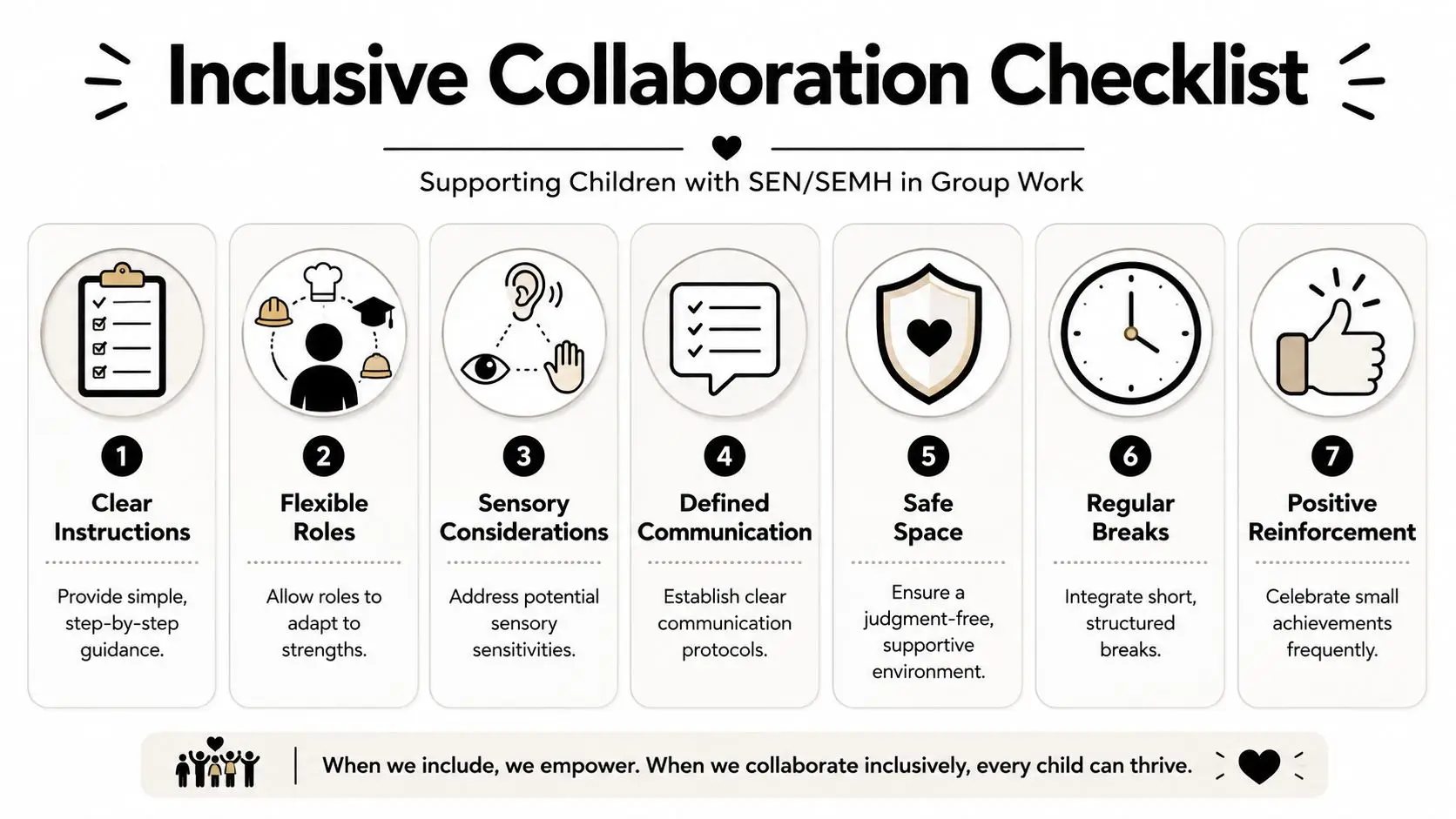
A child who struggles with live verbal discussion might still contribute brilliantly by preparing written ideas in advance. A pupil with attention difficulties may manage a shorter, sharply defined role much better than a broad open-ended one. A student with anxiety may participate more confidently if the teacher assigns roles directly instead of asking the group to negotiate them socially.
Useful approaches include:
- Small-group scaffolding: Keep groups smaller where possible so children aren't trying to track too many voices or expectations at once.
- Teacher-led role assignment: Match tasks to strengths. One child may research, another may illustrate, another may present, another may edit.
- Real-time feedback loops: Correct confusion early. A short message such as “You're on the right track, just complete the first slide today” can prevent a complete shutdown.
- Clear communication rules: Decide who speaks first, where files go, and how students ask for help.
- Managed breaks: Some children need short pauses to regulate and return.
Inclusion isn't about lowering expectations. It's about removing barriers that stop a child showing what they can do.
Support tools can widen access
Technology can help when it's chosen with care. Some pupils benefit from speech-to-text, simplified navigation, switch access, or voice control tools that reduce the physical effort of participation. For families exploring practical options, this guide to accessibility tools for cerebral palsy offers a useful starting point for thinking about access in digital learning spaces.
The emotional side matters just as much as the technical side. Children need to feel safe making a partial contribution while they build confidence. They need adults who notice early signs of distress. They need group work to feel like belonging, not exposure.
A child doesn't need to be the loudest voice in the room to shine. Sometimes success looks like speaking once when they would usually stay silent. Sometimes it looks like completing a shared slide on time. Sometimes it looks like trusting the group enough to stay in the process.
Measuring What Matters Most in Collaboration
If assessment focuses only on the final presentation, children learn the wrong lesson. They learn that polished output matters more than how they treated each other, how they solved problems, or whether they carried their share responsibly.
That's why group assessment needs to look at the process as well as the product. A child who supported a teammate, met checkpoints, and improved after feedback has demonstrated real learning, even if the final slideshow isn't perfect.
Why traditional grading misses key growth
A single project mark can hide too much. It can mask uneven participation. It can discourage quieter pupils whose contributions happened behind the scenes. It can also leave parents confused about what their child actually learned beyond the content itself.
A more useful approach separates the strands of success. Teachers can assess the shared final outcome, but they should also look at how each student communicated, responded to feedback, and followed through on their responsibilities.
For older students working on research-heavy tasks, structured support can also help them gather and organise information more independently. In that context, tools with advanced research capabilities may help students compare sources, pull together themes, and prepare better-informed contributions before they meet with their group.
A simple rubric parents can understand
Here is a practical model that values the whole journey:
| Area | What to look for |
|---|---|
| Individual accountability | Did the child complete their agreed role and meet deadlines |
| Communication | Did they respond respectfully and clearly to others |
| Contribution to group harmony | Did they listen, compromise, and help the team move forward |
| Use of feedback | Did they improve their work after teacher or peer comments |
| Creative or critical thinking | Did they add ideas, solve problems, or make thoughtful decisions |
| Final product contribution | Is their input visible in the finished work |
This kind of rubric gives children a fairer picture of success. It also gives parents better language for discussing progress at home.
Questions worth asking after the project
Instead of asking only, “What grade did you get?”, try:
- “What part of the group work did you handle well?”
- “When did you have to adapt your idea?”
- “How did your team solve a problem?”
The most valuable outcome of collaboration is often a skill that doesn't fit neatly onto one slide.
When children hear that message often enough, they stop seeing group work as a performance they might fail. They start seeing it as practice in being capable, reliable, and considerate with other people.
Partnering for Safety and Success Online
Safety sits underneath every successful online project. Without it, children hold back, parents worry, and trust erodes quickly. With it, collaboration becomes more relaxed, more focused, and more enjoyable.
That matters acutely for families of children with additional needs. According to the UK Children's Commissioner Annual Report 2024, 72% of UK parents with children with special educational needs reported heightened anxiety about online safety during remote learning. That concern is understandable. Shared digital spaces bring real questions about communication, supervision, and how quickly problems are addressed.

What strong safeguarding looks like day to day
Parents don't need vague reassurance. They need to know what protections are in place. In online collaborative work, that means using monitored platforms, keeping communication inside approved systems, setting clear behaviour expectations, and responding quickly if a child feels uncomfortable.
A useful checklist includes:
- School-managed spaces: Group work should happen in monitored digital environments rather than scattered private apps.
- Clear conduct rules: Children need explicit guidance on respectful language, turn-taking, and what to do if something feels wrong.
- Zero-tolerance anti-bullying practice: Expectations should be visible, enforced, and backed by action.
- Named adults: Students and parents should know exactly who to contact with a concern.
- Transparent follow-up: When an issue is raised, families need timely communication about what happens next.
The home-school partnership is part of safeguarding
The safest online environment is built jointly. Schools provide structure and oversight. Parents provide context, observation, and emotional support. When those two parts connect well, children are much less likely to struggle in silence.
At home, simple habits help. Ask your child how group conversations feel, not just whether the work is finished. Notice if they suddenly avoid a platform they usually use without fuss. Keep an eye on emotional signals such as dread before sessions, irritability afterwards, or repeated worries about peers.
When a child knows that both home and school will listen calmly and act quickly, they're more likely to speak up early.
Collaborative projects online should widen a child's world, not make it feel less secure. Safety and belonging aren't extras added after the planning. They're what allow learning, confidence, and healthy teamwork to happen in the first place.
Choosing an online school is about more than curriculum. It's about whether your child will feel known, supported, and safe while they learn with others. Queens Online School offers a fully online British education with live teaching, small classes, subject-specialist staff, and a strong focus on inclusion, wellbeing, and meaningful participation. If you're looking for an environment where collaborative learning is carefully structured around the needs of the whole child, it's well worth exploring what the school can offer your family.