


93% of teenagers felt more confident communicating digitally, compared with only 8% who felt more confident face-to-face, according to a 2025 UK survey of 3,208 parents and teenagers published by ACS International Schools. That gap helps explain why a child can chat comfortably online yet freeze when everyone starts watching them speak. Developing presentation skills online isn't about learning to operate slides. It means making live communication manageable, with structured rehearsal and emotional safety deciding the pace.
Build a Safe Speaking Ladder for Anxious Learners
Say your child chats easily all evening, explaining a game to friends and sending confident voice messages. The next morning, a teacher asks them to share their screen and explain their project. Their shoulders tighten, their mind goes blank, and they suddenly can't find the words.
These are different situations. A message can be edited, delayed or deleted; a live presentation involves being heard, watched and potentially questioned immediately. Being comfortable with digital tools doesn't mean a child feels comfortable being evaluated.
Treat the hesitation as information, not defiance. A child may need a smaller audience, a more predictable task or permission to practise without anyone watching first.
Make the next step small enough to attempt
A speaking ladder gives the family a shared plan. Start where the child can participate without feeling overwhelmed, rather than where their age or subject knowledge suggests they ought to be.
The ladder below shows how private rehearsal can lead towards a wider audience.
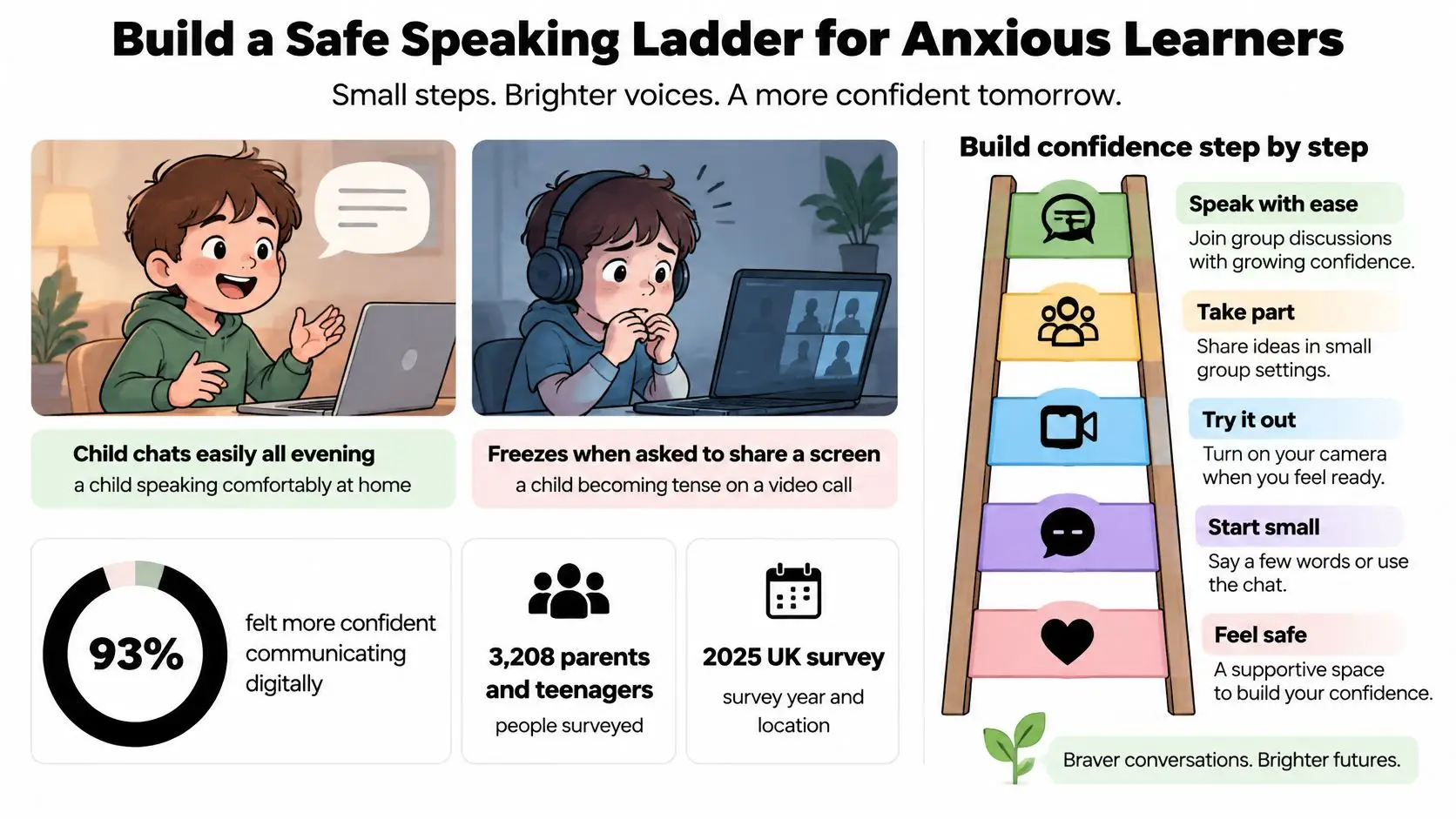
A safe ladder for presentation skills online
| Stage | Format | Who is listening | What done looks like |
|---|---|---|---|
| Private recording | A suggested 60 to 90-second recording | Child and one trusted adult | Clear opening and ending, voice easy to hear |
| Small familiar group | Live talk of 2-3 minutes, chat or poll allowed | Two or three known peers | One question answered or one peer response given |
| Live questioning | Same short talk plus one or two spoken questions | Known adult plus a small group | Answer stays on topic for at least one full sentence |
| Larger audience | Class talk or showcase, live or recorded | Class, club or family group | Signposted structure and one planned interaction |
These timings are suggested practice tasks, not developmental targets. Move forward when the child says the current stage feels manageable, not just because they've completed it once.
This is a practical form of scaffolding in education: keep the communication challenge, but provide enough support for the learner to attempt it. For a child with speech, language or processing needs, that might mean extra response time and a visual running order.
Ask about feelings before asking for a performance
Start each session with an emotion check-in. Offer calm, nervous or excited as options, with space for the child to choose something else or respond privately.
Don't assume they'll volunteer a concern: only 48% of pupils said they would feel very or fairly comfortable speaking to school or college staff about their mental health in May 2025, down from 57% in September 2024, according to the Department for Education's pupil survey.
For a hypothetical five-minute talk, create three achievable wins: choose a meaningful topic, practise a 30-second section, then join the sections for a chosen audience. Name a specific strength before suggesting a manageable adjustment.
Research involving lower-attaining primary pupils in England connects distress with difficulties in competence, autonomy and relatedness, giving a useful rationale for practice built around success, choice and connection. Let the child choose the topic, pace and presentation mode wherever the learning task allows.
When a child freezes: Pause, reassure them that they can return to the point, and offer a restart from the last sentence. Open the backup slides if that helps them regain their place.
At Queen's Online School, our lessons, assessments and support adapt to each learner's pace, preferences and goals. Mentor conversations cover academic goals and personal growth, including independent learning, self-advocacy and resilience. Asking for a pause or explaining which support helps is part of learning to communicate, not a failure to present.
How to Prepare and Deliver an Online Presentation
Consider a Year 8 pupil explaining a science fair project to three classmates on a video call. They understand the experiment but feel uneasy about forgetting what comes next. A repeatable preparation routine gives them concrete actions instead of the vague instruction to be confident.
A UK university comparison of oral presentations recorded mean marks of 71.34% for live, in-person presentations, 73.34% for pre-recorded online presentations and 71.58% for live online presentations, with no statistically significant difference between the live formats. This doesn't guarantee a school pupil's result, but it challenges the assumption that online delivery is inferior.
The pupil-friendly visual below summarises the preparation tasks.
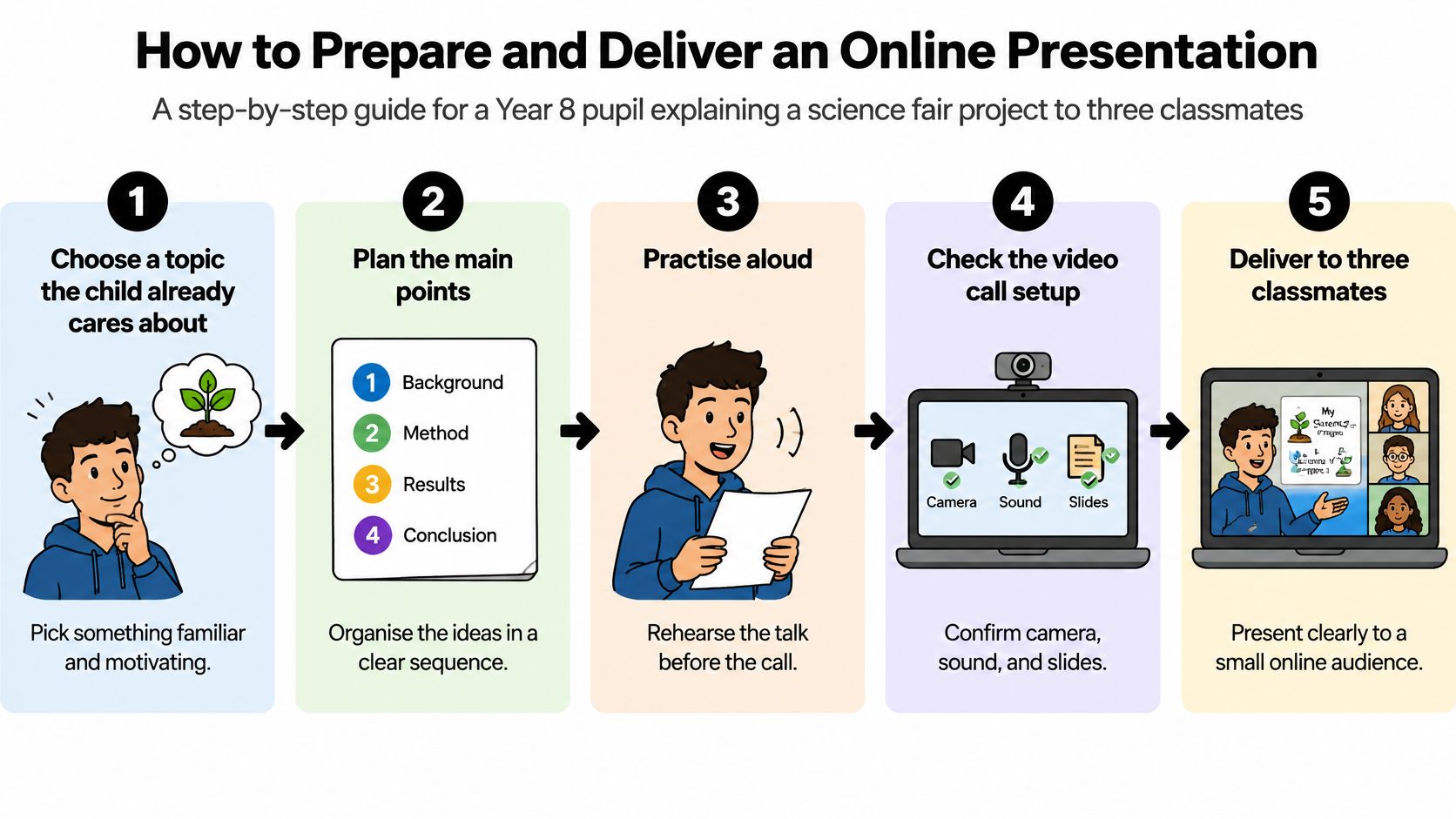
Follow a predictable preparation order
Choose something the child cares about. Our science pupil might explain why their model bridge held more weight after they changed its shape. Name a trusted listener and ask what that person needs to understand by the end. Interest gives the pupil something meaningful to explain.
Test the delivery route beforehand. Open the actual platform and practise joining, unmuting and sharing the presentation. Use the camera, sound and slide checks under Camera Sound and Slides Children Can Manage. The university comparison also described minimal technical problems and using two chairs as helpful practical arrangements, a reminder that comfort and room layout deserve attention.
Write a simple speaking spine. Use an opening sentence, two main points and a closing sentence. For the bridge project, the points could be what changed and what happened during testing. Add spoken transitions so listeners don't have to infer the connection.
Rehearse the whole task in its actual format. Record a timed attempt while using the slides and controls the pupil will use during delivery. Practising only the speech misses the awkward moment when they have to find the share button while keeping their place.
Plan an interaction and a response to silence. The pupil could ask classmates which bridge shape they predict will hold most weight. Agree beforehand that a named classmate will answer first if nobody volunteers. Don't leave an anxious speaker responsible for rescuing an unresponsive group.
Deliver, then prepare for the next attempt
Complete the presentation without turning it into repeated auditions. Let the pupil finish before discussing the next attempt. Unless they're asking for help, avoid interrupting every stumble or restarting whenever a sentence sounds imperfect.
Keep a contingency ready. Share the slides in the agreed class chat beforehand and have a backup device available. If a second device joins the call, mute its microphone and speaker to prevent echo. Agree who will continue displaying the slides if the pupil disconnects.
An optional video resource can accompany the practical rehearsal.
The common pitfall is assuming that a strong classroom talk is automatically ready for a camera. A pupil who speaks fluently beside a physical model may find screen-sharing unfamiliar, or may lose their thread when classmates become small tiles.
Readiness means knowing what to say and how to continue. Before the call begins, the child should know their opening line by heart and exactly where the backup slides live.
Camera Sound and Slides Children Can Manage
A presentation setup should feel like arranging a workable desk, not building a television studio. Give the child a short checklist they can eventually manage independently. Adults can help with unfamiliar controls without taking over every decision.
For a suggested ten-minute check, begin with the device and finish with what a listener can hear and see. Don't spend the available practice time choosing decorative backgrounds while leaving the microphone untested.
This checklist keeps the technology task visible and finite.
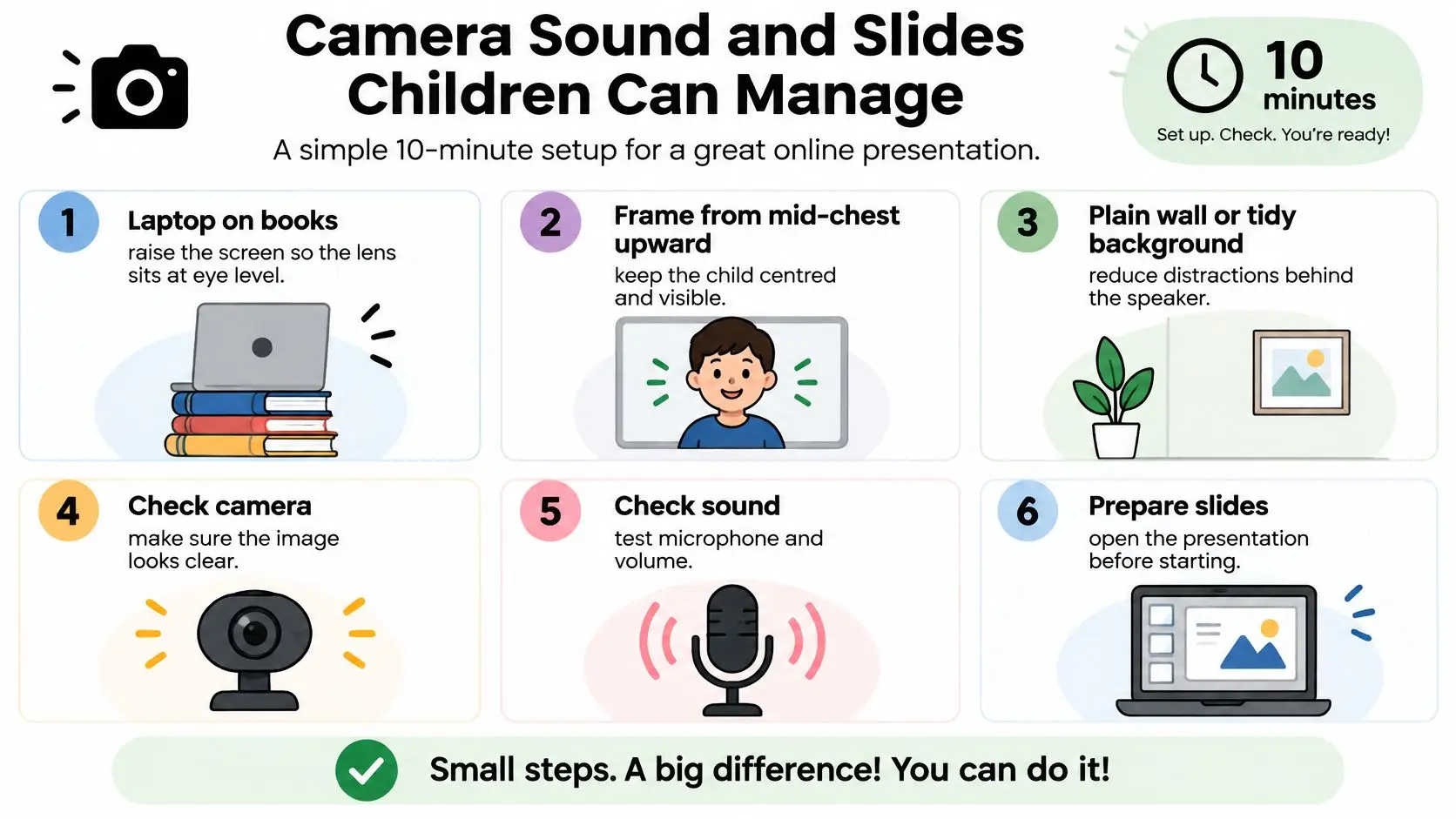
Make the child comfortable and easy to hear
- Raise the lens. Place the laptop on a stable stack of books so the camera sits near eye level. Check that the arrangement doesn't wobble and that the child can still use the keyboard comfortably.
- Check the frame. Aim for a view from mid-chest upwards, with a plain wall or tidy shelf behind. Let the child see the preview before the audience joins so there are no unpleasant surprises.
- Light the face. Sit facing a window or place a lamp in front of the child. A bright window behind them can leave their face difficult to see.
- Listen through the actual microphone. Try headphones if the call produces echo. Check the selected input rather than assuming the platform has chosen the right microphone.
- Remove avoidable interruptions. Close games, personal chats and notification banners. Share the presentation window rather than the whole desktop when the platform allows it.
Don't require an uncomfortable posture for the sake of appearing polished. A child who needs movement or supportive seating should be able to use it while remaining audible and able to operate their materials.
Our guide to technology-enhanced learning offers wider context for using digital tools to support learning. For this task, the useful question is whether the technology helps the child explain their thinking.
Let slides support speech rather than replace it
Use a clear idea per slide, a short heading and strong contrast, such as dark navy on white. As a practice constraint, try a heading of no more than six words, using the largest text that fits comfortably. Keep necessary labels on diagrams, but remove paragraphs the child would otherwise read aloud.
Speaker notes hold the sentences. Slides hold the image, example or key term that helps the listener understand.
For example, a primary pupil could show three holiday photographs and say a sentence about each. A photograph of rock pools gives them something concrete to describe; a paragraph pasted over it gives them a reading task instead.
Practical rule: A child should be allowed to glance at notes and pause. Neither action means they've lost control of the presentation.
Build dependable spoken signposts into the notes: first, the important part, and what I want you to remember. If reading aloud is difficult, use picture prompts or keywords rather than a dense script.
Finish with a parent listening from another room while viewing the shared slides on a phone. If they can't hear the closing line or read the heading, the setup hasn't passed yet. Fix the sound or type size before inviting an audience.
Helping Children Hold an Audience as They Grow
The move towards secondary school deserves particular care. The National Literacy Trust's 2025 survey of 105,583 UK children and young people aged 8–18 across 497 schools found confidence speaking before an audience was 48.7% among 8–11-year-olds, compared with 38.6% among 11–14-year-olds; confidence giving a presentation was 53.0% and 45.7%, respectively.
These are age-group comparisons, not evidence that every child loses confidence. Still, a Year 7 pupil who happily shared work in Year 6 may now feel more exposed among unfamiliar peers. Giving them a better slide template won't necessarily address that worry.
How speaking confidence shifts with age
| Measure | Ages 8-11 | Ages 11-14 | All ages 8-18 |
|---|---|---|---|
| Confident speaking in front of an audience | 48.7% | 38.6% | 40.2% |
| Felt good at expressing themselves | Not reported in these findings | Not reported in these findings | 44.8% |
| Able to use body language effectively | Not reported in these findings | Not reported in these findings | 51.6% |
| Confident giving a presentation | 53.0% | 45.7% | Not reported in these findings |
The figures describe pupils' confidence and self-perception, not an objective assessment of their speaking ability. A hesitant child may have thoughtful ideas and strong subject knowledge while finding the social situation difficult.
Teach listeners how to help
An audience isn't merely a group waiting to judge. Give classmates useful, bounded responsibilities before asking a reluctant pupil to speak.
- Opening listener. Notice whether the speaker makes the topic clear at the start.
- Question keeper. Prepare a relevant question and wait for the agreed invitation.
- Key-message listener. Identify the sentence that explains the speaker's main point.
Make turn-taking explicit through raised hands, chat or a named next speaker. Don't rely on children to interpret overlapping voices or guess whether a silence means it's their turn. For learners who struggle with social cues, a visible speaking order can remove uncertainty without reducing the intellectual challenge.
At Queen's Online School, our teachers regularly arrange virtual breakout rooms and group projects so pupils can collaborate on shared work, discussions and presentations. Those activities allow a pupil to contribute as a listener, questioner or co-presenter rather than always carrying a whole talk alone.
Notice expressive growth
Online body language can be taught through small actions: shoulders directed towards the audience, a pause before an important idea, or a gesture that remains visible. These are options for clearer communication, not instructions to hide a child's natural mannerisms.
Participation growth matters more than a polished final show.
A useful success might be asking a prepared question, responding thoughtfully to a classmate or explaining a disagreement respectfully. Let the child choose an audience job they're willing to attempt before they're asked to be the main speaker again.
A Short Feedback Loop and a Fair Rubric
Begin with a rehearsal, a brief prompt and a chance to try again. Saving every correction for a long critique afterwards leaves the child with too much to remember and no immediate opportunity to use it.
A University of Glasgow experiment involving 63 participants compared real-time interactive feedback with after-action feedback, finding expert-rater reliability ranging from moderate to good across separately assessed delivery dimensions. That distinction matters: you can comment on structure or voice without making a sweeping judgement about the child's overall ability.
Use feedback while the task is still fresh
The first cycle happens during rehearsal. Agree on a discreet prompt for the behaviour the child is practising. A parent might point to a pause symbol when the pupil rushes, or indicate the outline when they miss a transition.
Don't comment on everything else. If the agreed focus is pace, an imperfect gesture can wait.
The second cycle happens immediately afterwards. Watch the recording once, name an observable strength, then choose two or three measurable changes. For example, notice that the pupil explained the experiment without reading, then agree to pause after the result and add a closing sentence.
This is formative assessment: use evidence from the attempt to decide what the learner should practise next. Specific praise helps because it tells the child what to keep doing, rather than asking them to interpret a general comment such as good effort.
Assess the task, not the child's character
Rubric for a child's online presentation
| Skill | Emerging | Secure | Note to write |
|---|---|---|---|
| Structure | Opening or ending is missing | Opening, two points and close are all audible | Which signpost to add next |
| Voice | Listener must strain or guess words | Heard clearly at a steady pace | One pace or volume change |
| Camera focus | Eyes stay on notes for key lines | Looks toward the lens on the important sentence | Which line to look up for |
| Interaction | No question, poll or check-in | One planned interaction actually happens | Who asks, and when |
| Technical readiness | Audio, slides or share fail | Sound clear, slides readable, backup ready | The one kit check still open |
Emerging means the pupil is attempting the skill. Secure means a listener can follow without extra help. Neither label describes intelligence, personality or worth.
Agree accessibility adjustments before using the rubric. Looking towards the lens shouldn't become a demand for sustained eye contact, and an agreed alternative should count where a child's needs make that appropriate.
Keep comments private rather than ranking pupils in the chat. A worried Year 10 pupil could submit a recording for individual feedback, allowing the teacher to assess communication without adding a public comparison.
Programme time for digital wellbeing, executive functioning, self-reflection and confidence-building belongs alongside speaking practice, not instead of it. The child still needs an achievable opportunity to use the feedback.
End by writing down the chosen changes and booking the next short attempt. They should leave knowing what to do differently, not carrying a list of everything that went wrong.
Choose This Week's Safe Speaking Step
The useful decision isn't whether your child is a natural speaker. It's which speaking task they can attempt this week with enough support to stay engaged.
A pupil may understand the content but dread questions. Another may enjoy answering aloud yet struggle to organise a longer explanation. Give them different next steps rather than treating confidence as a single quality they either possess or lack.
Make a shared decision
Ask these questions together, then stop planning and choose an attempt.
- Which rung matches your actual nerves this week? Choose for the child who's here today, not an idealised version who never feels tired, worried or embarrassed.
- Which single rubric skill will you improve? Make the priority visible so the pupil doesn't feel responsible for correcting everything.
- What support would make this possible? Consider a recording, familiar peer, notes, shorter slot or the option to speak after someone else.
Write the answers where both parent and child can see them. Book a suggested ten-minute retry rather than leaving practice as a vague promise.
If attendance, persistent worry or a previous upsetting experience is part of the picture, share that context with the teacher privately. At Queen's Online School, parent-teacher meetings take place by video call and can be booked as needed to discuss progress, raise concerns or set goals.
Make speaking part of ordinary learning
For families who need ongoing support, we provide a British curriculum from primary through A Level, with small online classes, qualified teachers, regular pastoral support and opportunities to interact with classmates. Our SEN and SEMH support includes specialised staff and individualised plans.
That setting allows communication practice to sit within ordinary lessons, collaborative work and supportive conversations rather than appearing only as a sudden performance. Progress can mean explaining an idea, asking for clarification or recovering after losing a sentence.
Choose the next manageable step, name who will listen, and agree when it will happen. The child doesn't need a verdict on their confidence. They need a clear opportunity to practise.
Queens Online School offers small live classes, pastoral care and individualised SEN and SEMH support, so speaking practice can develop alongside everyday learning. Visit Queens Online School to explore an online learning setting where your child's communication goals, emotional needs and next achievable steps can be considered together.