


You may be sitting at the kitchen table with three browser tabs open, trying to decode phrases like LMS, adaptive assessment, breakout rooms, and AI transcription while your child asks the only question that matters: “Will I like it?”
That's the main issue. Parents aren't searching for software. They're searching for calm, consistency, safety, and a school day that doesn't leave a child feeling lost or overlooked.
A good online learning environment doesn't begin with features. It begins with the child's experience of those features. Does the platform help them find what they need without stress? Can they ask for help privately if they feel anxious? Will they be seen by a teacher, not just processed by a system? Those are the questions that tell you whether virtual classroom technology is serving education or just digitising it.
Navigating the New World of Online Learning
A parent often reaches online schooling after a difficult stretch. A child may be exhausted by the pace of a busy classroom, unsettled by bullying, under-challenged, over-anxious, or not flourishing in a setting that treats every learner the same. Then comes the next challenge: a flood of educational technology terms that can make an already emotional decision feel even heavier.

The scale of this shift matters. The UK online education market is projected to grow from USD 3.1 billion in 2024 to USD 5.7 billion by 2034, according to analysis of the UK online education market. For families, that growth brings more choice, but also more pressure to tell the difference between a polished platform and a supportive school.
What parents usually worry about
Most concerns are practical, but they're also profoundly emotional.
- Will my child feel alone: A screen can feel impersonal if teachers don't know how to create warmth, routine, and belonging.
- Will they fall behind: Some children stop asking questions when they're confused. In an online setting, weak teaching can hide that problem rather than solve it.
- Will technology create more stress: If a child has to click through five places to find homework, the school day starts with frustration instead of focus.
- Will support be there in the moment: A child rarely needs help “sometime later”. They need it when the lesson is live and confidence is wobbling.
A child doesn't experience technology as a list of functions. They experience it as ease or confusion, safety or exposure, confidence or dread.
Reframing the question
The useful question isn't “What platform does the school use?” It's “What kind of day does this technology make possible for my child?”
For one pupil, the right setup means a predictable timetable, clear lesson links, and a teacher who notices when their camera is off because they're overwhelmed. For another, it means live annotation on a shared whiteboard, so they can see algebra unfold step by step instead of trying to keep up with a fast verbal explanation. For a teenager who's rebuilding trust in education, it may mean a quiet chat box message from a teacher that says, “You're on the right track. Stay with it.”
That's when virtual classroom technology becomes valuable. Not when it looks advanced, but when it helps a child settle, participate, and believe they can succeed.
What Is a Virtual Classroom Really
A virtual classroom is easiest to understand if you stop thinking about apps and start thinking about a school building.
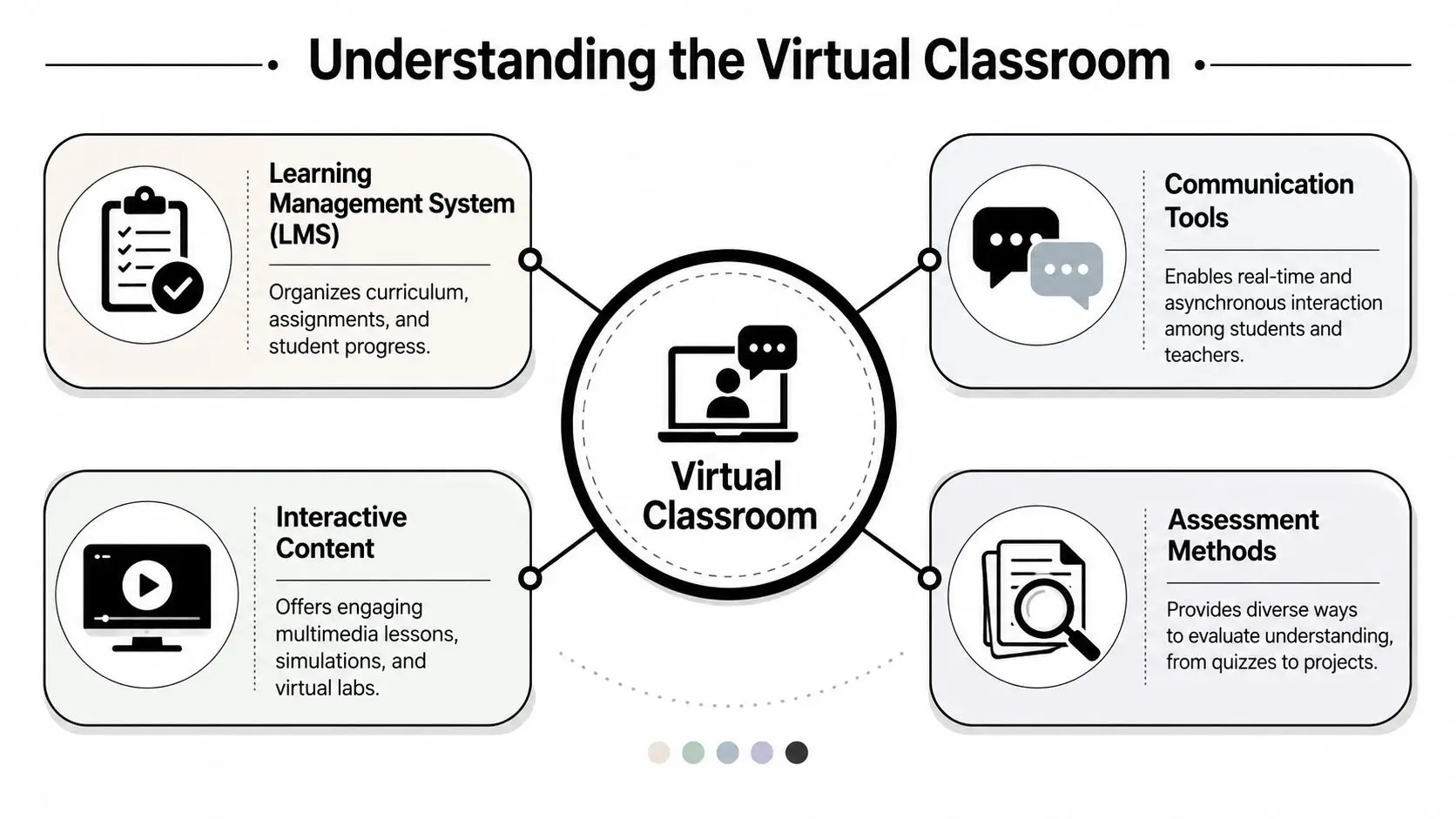
Each part of the technology plays a different role. On its own, no single tool creates a proper learning environment. Together, they form the digital equivalent of corridors, classrooms, planners, group tables, exercise books, and teacher feedback.
Families who are new to this often find it helpful to compare online systems with a physical campus. A more detailed explanation of that structure appears in this guide to the virtual learning environment.
The school building
The Learning Management System, often shortened to LMS, is the building itself. It's where lessons are organised, assignments are posted, resources are stored, and progress is tracked.
If the LMS is well designed, a child knows where to go each morning. They can find yesterday's notes, today's lesson, and tomorrow's homework without panic. That matters more than many adults realise. Organisation isn't just administrative. It protects energy for actual learning.
A poor LMS does the opposite. It scatters files, buries instructions, and forces children to rely on memory when they should be concentrating on content.
The classroom
The live video platform is the classroom, where the teacher explains ideas, students ask questions, and the lesson takes shape in real time.
In a strong virtual classroom, the teacher isn't merely broadcasting. They're reading the room, even through a screen. They use voice, pacing, eye contact, screen sharing, and pauses to keep students with them. A history lesson may involve a source on screen, a quick poll to test understanding, then discussion. A maths lesson may use a virtual whiteboard so the teacher can solve problems live and students can follow each step.
The group table and the exercise book
Breakout rooms are the small-group tables. Shared documents are the exercise books passed around during collaborative work. Quizzes, short written responses, and live checks for understanding are the teacher walking between desks, noticing who needs support.
Practical rule: If a school describes its technology only in terms of access, not interaction, you're hearing about delivery, not teaching.
The hidden glue
The most effective systems also include the parts children may not name but absolutely feel:
- Clear notifications: They reduce missed work and last-minute panic.
- Simple communication tools: They make it easier to ask a question without embarrassment.
- Accessible layouts: They help pupils who are distracted by clutter or overwhelmed by too much text on screen.
- Consistent routines: They turn a digital environment into something dependable.
That's what a virtual classroom really is. Not a video call. A full learning environment, built piece by piece.
The Core Components That Nurture Learning
The strongest virtual classroom technology doesn't try to impress adults. It quietly removes friction for children.
When people talk about online learning tools, they often focus on what the software can do. The better question is what each component allows a child to feel and achieve. The answer should always include both academic progress and emotional steadiness.
Live teaching tools that keep a child present
The most useful live tools are the ones that recreate the rhythm of a real classroom. Virtual whiteboards, real-time polls, and breakout rooms are among the most essential technologies because they replicate in-person dynamics, improve engagement, and let teachers adjust their teaching immediately, as outlined in this review of essential virtual classroom technology.
That matters in practice.
A virtual whiteboard helps a pupil watch an idea unfold. In English, a teacher can annotate a poem line by line. In science, they can label a diagram as they explain it. For a child who becomes anxious when explanations move too quickly, seeing the process live can be the difference between following the lesson and mentally dropping out.
Real-time polls do something subtler. They give hesitant students a low-pressure way to show whether they understand. A child who'd never put up a hand to say “I'm confused” may still click an answer. The teacher sees the pattern immediately and can reteach before misunderstanding hardens into shame.
Structure that lowers cognitive load
A good LMS acts like a reliable school planner and locker combined. Children know where work lives, where feedback appears, and what happens next.
That predictability is especially important for pupils who are easily overwhelmed. If every subject is organised differently, children spend energy decoding the platform instead of learning from it. If lesson recordings, homework, and teacher comments appear in the same places every time, the school day feels manageable.
A useful way to compare this is with other digital study ecosystems. Parents looking at broader online learning habits sometimes explore effective IR study platforms because they show how structure, resource access, and guided interaction shape independent learning beyond a single lesson.
Tools that support friendship and confidence
Children don't only learn from teachers. They learn from being part of a group.
Breakout rooms, moderated chat, collaborative slides, and shared documents can create that sense of working alongside others. Used well, these features help a child test an idea with two classmates before speaking to the whole class. They give quieter pupils a gentler route into participation.
Used badly, they can feel chaotic. A breakout room with no task, no time frame, and no teacher oversight often leaves anxious children silent while more confident pupils take over. The tool isn't the benefit. The teacher's design is.
The question isn't whether a school has collaboration tools. It's whether staff use them in ways that make children feel included rather than exposed.
Feedback that arrives at the right moment
Children make faster progress when feedback is timely and specific. In virtual settings, that can happen through quick quizzes, live comments on shared work, short voice notes, or a private message that redirects a pupil before they drift too far off course.
Consider two versions of the same lesson. In one, a child completes a task, submits it, and waits. In the other, the teacher spots a misunderstanding halfway through, intervenes gently, and helps the child recover in the moment. The second version protects not just attainment, but morale.
That's the standard worth looking for. Technology should help teachers notice sooner, respond faster, and teach more personally.
Putting Your Childs Needs First with SEN and SEMH Support
A virtual classroom that isn't designed for inclusion will fail the children who most need care.
For pupils with SEN or SEMH needs, technology can either soften the school day or sharpen every difficulty. A cluttered screen can overload attention. Rapid verbal instruction can leave a child behind before they've processed the first sentence. An exposed participation model can make an anxious learner disappear in plain sight.
Accessibility isn't an extra
In England, speech, language, and communication needs are the most common type of need for pupils with an Education, Health and Care plan, affecting 25.7% of these students, according to special educational needs data for England. In a virtual lesson, that makes live captioning and visual scaffolding far more than helpful additions. They can be the difference between a child staying regulated or shutting down.
A practical example is simple. If a teacher gives fast verbal instructions for a writing task and the child misses one step, they may freeze, guess, or give up. If the same instructions also appear on screen in short chunks with icons or highlighted keywords, the child can process at their own pace and begin with confidence.
Small design choices carry emotional weight
The best support often looks modest from the outside:
- Live transcription: Helpful for pupils who miss spoken information, but also for children with attention difficulties who need to glance back without asking the class to stop.
- Private chat: A lifeline for a student who won't speak aloud when they're stuck.
- Recorded lessons: Useful when a child needs to revisit content after emotional overwhelm or fatigue.
- Simple visual layouts: Less clutter means fewer distractions and less cognitive strain.
- Teacher-controlled pacing: Space for pauses, recap, and checking understanding protects vulnerable learners from spiralling stress.
A family can also look beyond the school platform itself and consider the child's daily executive functioning. For some learners, outside tools can help with transitions, routines, and assignment planning. Parents comparing supportive options may want to find time management apps for ADHD that complement the school's systems and reduce the pressure of remembering everything at once.
A child with additional needs shouldn't have to work twice as hard just to access the same lesson.
Support must be built in from the start
This is why a school's approach to SEN support matters as much as its technology stack. Families can see the difference when they review how a school handles adaptations, communication, and classroom practice. A useful starting point is to examine its approach to SEN support.
Inclusive design also means recognising that some children find online learning safer than physical school. A pupil with SEMH needs may feel more able to participate from a familiar environment, with a quiet route to contact the teacher and fewer social pressures competing for attention. That doesn't happen automatically. It happens when technology is chosen and used with empathy.
How Queens Online School Creates an Inclusive Virtual World
The theory becomes real when you follow a child through an ordinary school day.
A pupil signs in before lessons begin. They don't need to search across multiple systems or guess where the day starts. The structure is clear, and that clarity matters. For many children, especially those who've had inconsistent experiences in education, the first emotional win is knowing where to go.

A day that feels organised and human
The lesson opens live with a subject specialist teacher and a small class. That combination changes the atmosphere. Small groups make it easier for a teacher to notice who's hesitating, who's thriving, and who needs a quieter invitation to contribute.
In practice, that may look like a teacher using a whiteboard to model a maths method, then a quick check for understanding before pupils try a problem themselves. It may look like an English teacher inviting responses through voice, chat, or shared annotation so students can participate in the way that feels most manageable.
The school named here is Queens Online School, which delivers a British curriculum online through live classes, subject-specialist teaching, small class sizes, and recorded sessions. For families, the key point isn't the platform alone. It's that the technology is used to support personalised learning paths rather than forcing every child through the same narrow route.
Technology chosen with care
The right tools aren't selected because they sound novel. They're selected because they help children learn without unnecessary strain.
That child-centred approach mirrors a wider principle in the sector. The UK government has launched a £1.7 million pilot for assistive technology, creating lending libraries so schools can test devices before committing, as described in the government announcement on assistive technology for children with SEND. The spirit of that approach is simple and wise: try what supports the child, and don't impose tools that create frustration or dependency.
A school should apply the same discipline to software. If a feature helps a dyslexic pupil read more independently, keep it. If a layout confuses younger learners, simplify it. If a communication tool increases anxiety, adapt the practice around it.
Later in the day, community matters just as much as curriculum. Online clubs, social spaces, and shared events give pupils reasons to belong beyond formal lessons.
Belonging doesn't happen by accident
A child's confidence often returns in small moments. They answer in class without fear. They revisit a recorded explanation and finally understand. They join a club and begin to feel known by peers, not just taught by adults.
That's what an inclusive virtual world should produce. Not passive attendance, but participation with dignity.
Evaluating an Online Schools Technology
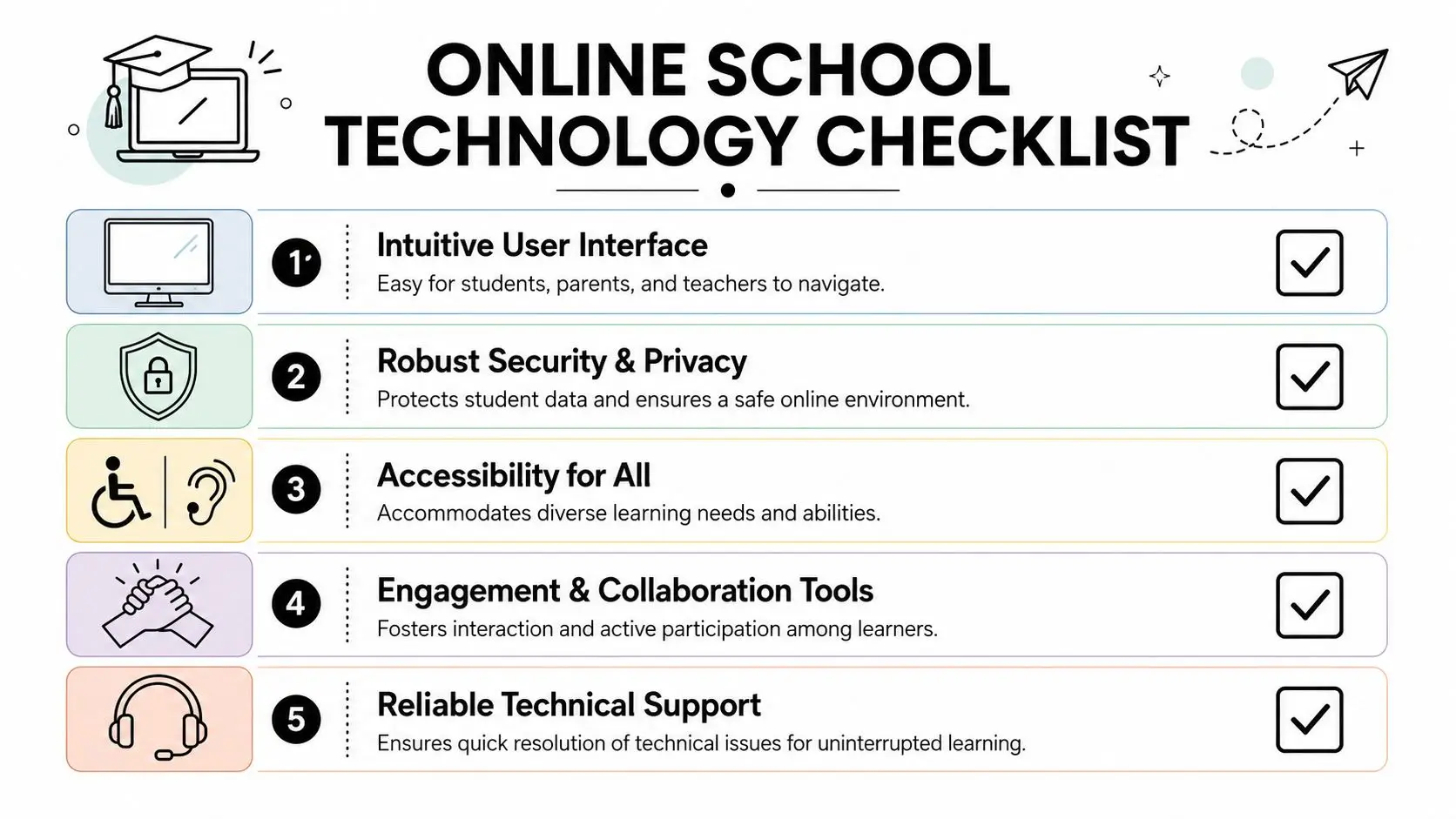
Parents don't need to become IT specialists. They do need to ask sharper questions.
With over 75% of UK secondary schools now using digital tools, parents should expect schools to give detailed, thoughtful answers about how technology supports teaching, learning, and wellbeing, according to this overview of how UK schools are using AI and technology in the classroom. If an admissions team speaks only in broad claims, keep asking.
A useful comparison point is to review examples of online learning platforms and notice how differently schools define student support. The same words can hide very different day-to-day experiences.
Questions that reveal the truth
Ask for specifics. Ask what happens in the lesson, not just what exists on the platform.
| Area of Focus | Question to Ask | Why It Matters for Your Child |
|---|---|---|
| Live teaching | How do teachers check understanding during a lesson? | It shows whether confusion is noticed early or left to grow. |
| Accessibility | Which tools support pupils with reading, attention, hearing, or communication needs? | Your child may need support built into the lesson, not added later. |
| Organisation | Where do students find homework, recordings, and teacher feedback? | A clear system reduces daily stress and missed work. |
| Safety | How do you manage chat, behaviour, and online bullying concerns? | Digital safety shapes whether a child feels secure enough to participate. |
| Teacher training | How are staff trained to use technology with empathy and consistency? | Good tools fail when adults use them poorly or unevenly. |
| Technical support | What happens if a child can't access a lesson or loses confidence with the platform? | Quick, calm support prevents small setbacks becoming larger ones. |
What strong answers sound like
Listen for detail such as:
- Lesson-level practice: “Teachers use polls, chat responses, and live annotation to check understanding.”
- Clear routines: “All assignments, recordings, and feedback appear in the same place in every subject.”
- Inclusive design: “Students can respond verbally, in writing, or through shared documents depending on need.”
- Pastoral awareness: “Staff know how to recognise withdrawal, not just misbehaviour.”
Key question: Ask the school to describe what happens when a child is confused, anxious, or technically stuck during a live lesson. Their answer tells you far more than a feature list.
Don't ignore the technical basics
The emotional experience of online school depends partly on hardware and connectivity. A child can't feel settled in a live lesson if audio keeps breaking or the screen freezes whenever they open a demanding task.
For UK-based virtual classrooms, guidance on technology requirements for online schooling recommends 25 to 50 Mbps download, 10 Mbps upload, and ping under 20ms for reliable video conferencing, with 10 Mbps download, 2 Mbps upload, and ping under 50ms as a minimum acceptable level. That same guidance notes that households with multiple students often need fibre broadband of 100 Mbps or more, and that laptops with Intel i5 or Apple M1 or M2 processors and 16GB RAM are better suited to more demanding school software than lower-spec devices.
Those figures matter because repeated lag, crashing, or poor audio doesn't feel like a neutral inconvenience to a child. It often feels like failure, even when it isn't their fault.
Beyond the Screen Technology for Human Connection
The most important truth about virtual classroom technology is also the simplest. Children don't remember platforms. They remember how school made them feel.
They remember whether they were left to struggle in silence or guided back with patience. They remember whether asking for help felt embarrassing or normal. They remember whether online learning felt cold and distant, or whether it gave them room to breathe, think, and grow.
That's why the right technology matters. Not because more tools automatically mean better education, but because thoughtful tools in skilled hands can create something human. A child can feel known in a live online class. They can find friendship in a digital community. They can rebuild confidence through clear routines, accessible teaching, and feedback that arrives before frustration turns into withdrawal.
For some families, that shift is more than convenience. It's relief.
Virtual classroom technology should never ask a child to adapt to the system at any cost. The system should adapt, as far as possible, to the child. When a school understands that, the screen stops being a barrier. It becomes a bridge to belonging, progress, and a more hopeful relationship with learning.
If you're weighing whether online learning could give your child more support, structure, and confidence, Queens Online School is worth exploring. Families can review how the school delivers live lessons, personalised support, and a British curriculum online, then decide whether that environment fits their child's academic and emotional needs.